

A blogger friend recently asked me for advice on Stripe plugins because she wanted an easier way to get paid on her WordPress site. She wasn’t trying to build a full online store — she just wanted a simple, hassle-free way to handle payments.
Stripe is perfect for bloggers in this situation. With the right plugin, you can add clean checkout forms to your site, process payments securely, and automate the small but time-consuming tasks that come with getting paid, so you can focus on creating rather than managing payments.
That’s why I put together this guide. These are my personal favorites — the best Stripe plugins for WordPress that help you accept payments smoothly, whether you’re selling products or services, taking donations, or offering subscriptions.
Overview: Best Stripe Plugins for WordPress
No time to read the full article? No problem! Check out this quick comparison table to help you find the best WordPress Stripe plugin for your needs:
| # | Plugin | Best For | Pricing |
| 1 | WP Simple Pay | Quick, no-fuss Stripe payment forms | $49.50/yr + Free |
| 2 | WPForms | Building any kind of form with Stripe payments | $49.50/yr + Free |
| 3 | Easy Digital Downloads | Selling digital products with Stripe | $99.50/yr + Free |
| 4 | MemberPress | Stripe payments for membership sites | $199.50/yr |
| 5 | FunnelKit Payment Gateway | Easy Stripe setup for WooCommerce stores | Free |
Before we dive more in-depth into the list, let’s look at why you should use a Stripe plugin to accept payments on your WordPress blog.
What Are the Benefits of Using Stripe in WordPress?
Stripe is the easiest way to collect credit card payments on your WordPress website. Unlike with other payment processing companies, you don’t need to set up a merchant account.
All you need to do is create a Stripe account, install a Stripe plugin on your WordPress site, and start collecting payments.
Let’s take a look at a few more benefits of using Stripe for collecting credit card payments online:
- Easy Setup – It only takes a few minutes to set up a Stripe account.
- No Account Needed – Your customers don’t need a Stripe account to pay you via Stripe.
- No Hidden Costs – Stripe doesn’t charge you any hidden fees, unlike other payment gateways such as PayPal.
- Easy On-Site Checkout – Customers can stay on your website to complete the Stripe payment, instead of being redirected to an external site. This keeps visitors on your site longer and boosts conversions.
- Reliable and Trusted – Stripe is one of the most reliable and popular payment gateways used by huge companies like Lyft, Instacart, Wayfair, and more.
Stripe requires you to use SSL on your website to accept payments. Check out this guide to learn how to get a free SSL certificate, if you don’t already have one.
How I Test and Review WordPress Stripe Plugins
I tested each Stripe plugin by actually setting up payment forms and running test transactions to see how they work in real-life situations. I wanted to get a sense of which plugins make Stripe integration smooth and hassle-free, and which ones end up feeling clunky or require extra technical know-how.
When you’re a blogger or creator, the last thing you want is to waste time figuring out complicated settings or troubleshooting payments. So I approached this like a real user: creating forms, running tests, and seeing how each plugin handles the day-to-day of accepting payments.
Here’s what I looked at for each plugin:
- Installation and Setup: I started from scratch with each plugin and timed how long it took to connect Stripe and get a working payment form.
- Payment Form Creation: I built forms for one-time payments, subscriptions, and donations to see how flexible and easy they are to use.
- Payment Methods Supported: I checked which modern payment options each plugin handles, like Apple Pay, Google Pay, and Buy Now Pay Later.
- Customization Options: I looked at how much control I had over form fields, styling, confirmation messages, and email receipts.
- Test Transactions: I ran test payments to make sure the checkout flow, payment confirmations, and customer experience all worked smoothly.
- Dashboard and Reporting: I explored each plugin’s interface to see how easy it is to track transactions and manage customers.
- Documentation and Support: I checked the guides, tutorials, and support channels to see how beginner-friendly they are.
This hands-on approach helped me figure out which plugins strike the best balance between being simple to use and packed with useful Stripe features — so you can start accepting payments quickly and without any headaches.
Now that you know the benefits of using Stripe, let’s dive into the list of the best Stripe payment plugins for WordPress.
1. WP Simple Pay: Best Overall Plugin for Fast, Easy, and Reliable Stripe Payments
- Easy to set up and use
- Drag and drop payment form builder
- 71+ ready-made payment form templates
- Accept one-time or recurring payments
- Give amount or percentage off coupon codes
- Customizable receipts
- Multi-language and currency support
- And more…
WP Simple Pay is the #1 Stripe payments plugin for WordPress. With WP Simple Pay, you can easily accept payments for services, products, or donations without setting up a complex shopping cart.
When I started using WP Simple Pay, the first thing I noticed was how simple the setup wizard made connecting Stripe. I followed a few clear steps, entered my API keys, and was ready to accept payments within minutes.
Thanks to the drag-and-drop payment form builder, it’s super easy to create Stripe payment forms. There’s also 71+ pre-made payment form templates to save you even more time.
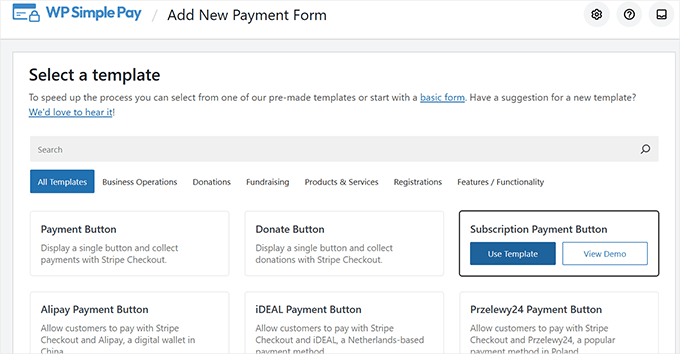
I love that there are templates for a wide range of needs, including cleaning services, web development services, coaching lessons, fundraising, and more.
You can add and arrange any form fields you need and choose from three different ways to display your payment form: Overlay, Embedded, and Stripe Checkout. Or, you can create a dedicated landing page.

You can accept one-time payments or collect recurring payments for subscription or installment plans. You can also allow custom payment amounts so visitors can pay what they want.
One feature I appreciated was letting customers cover processing fees. This helped offset Stripe’s transaction costs without increasing my base prices. It felt like a fair option to offer.
All of the payment information is stored on Stripe’s website, which provides your customers with secure payment while also helping your WordPress site load quickly.
WP Simple Pay is optimized for mobile users, so the checkout process will be hassle-free on smaller screens. Plus, you can allow your customers to pay with Apple Pay, Google Pay, Buy Now Pay Later services, and more, which gives people more flexibility when paying.
Overall, I think WP Simple Pay is the fastest and easiest way to start accepting Stripe payments on your WordPress blog, while still being powerful enough to grow your business. Be sure to check out our WP Simple Pay review to learn more!
| Pros of WP Simple Pay | Cons of WP Simple Pay |
| ✅ Straightforward and fast setup process ✅ Accept Stripe payments without full eCommerce system ✅ Professional payment form templates for various business needs ✅ Modern, user-friendly payment form builder ✅ Supports one-time and recurring payments ✅ Allows customers to cover processing fees automatically | ❌ The free version is limited to basic Stripe payments ❌ Advanced features may require a higher-tier plan |
Pricing: WP Simple Pay starts at $49.50 per year. There’s also a free version of WP Simple Pay Lite with basic features.
Why I Recommend WP Simple Pay: WP Simple Pay is at the top of my list because it’s the fastest, most straightforward way to accept Stripe payments on WordPress. You can start taking payments without setting up products, carts, or a full store, which makes it ideal for bloggers who just want a simple, reliable way to get paid.
2. WPForms: Build Any Form and Accept Stripe Payments

- Easy drag and drop form builder
- Seamless Stripe integration
- 2,000+ pre-made form templates
- Accept one-time, recurring, and custom amount payments
- Smart conditional logic to personalize forms based on user input
- Coupons addon to offer fixed and percentage discounts
- Responsive and mobile-friendly
- And much more…
WPForms is one of the most popular form builders for WordPress, and it’s used by over 6,000,000+ website owners. With WPForms, you can easily create any type of form and accept online payments via Stripe, PayPal, Square, and Authorize.net.
Using the drag-and-drop builder and 2,000+ form templates, you can quickly create a order form or donation form, without touching a line of code. Customizing your form is simple, just drag the fields you want into your form, and edit them by pointing-and-clicking.
I like that you can add conditional logic to your forms as well, which lets you show or hide payment fields based on what users selected earlier in the form.
WPForms lets you accept one-time and recurring Stripe payments, and you can add multiple payment methods to a form, not just Stripe. Connecting Stripe was simple, WPForms walked me through each quick step clearly.
You can display the payment forms anywhere on your site, including pages, posts, and sidebar widgets.
Custom notifications were easy to set up too. You can configure emails to go out automatically after someone submits a payment.
Plus, I really love that you can use WPForms to create all types of forms like contact forms, registration forms, newsletter signup forms, and much more—it’s more than a simple payment plugin. I’ve been using this plugin for years, if you want to learn more about my experience, see my full WPForms review.
| Pros of WPForms | Cons of WPForms |
| ✅ Drag-and-drop form builder makes creating any type of form easy ✅ 2,000+ pre-built templates for payments, orders, donations, and more ✅ Easily accept Stripe, PayPal, Square, and Authorize.net payments ✅ Supports one-time and recurring payments ✅ Conditional logic for dynamic forms based on user input | ❌ Recurring payment feature requires a Pro license or higher ❌ The free version charges an additional 3% fees on Stripe transactions |
Pricing: The free version of WPForms allows you to accept Stripe payments, with only a 3% transaction fee on payments made through your forms.
Check out a quick video guide here:
To remove the additional transaction fees and unlock other supported payment methods, you need to upgrade to the Pro plan, which costs $199.50 per year.
Why I Recommend WPForms: WPForms is more than just a payment plugin—it’s a full-featured form builder that makes creating almost any type of form easy. Whether you want to collect payments, run donations, or build registration forms, WPForms handles it all with a simple drag-and-drop interface, clear Stripe integration, and flexibility to display forms anywhere on your site.
3. Easy Digital Downloads: Ideal for Selling Digital Products
- Full shopping cart system
- Multiple payment gateways like Stripe, PayPal, and Amazon
- Allows for Stripe subscription payments and one-time payments
- Discount codes with settings for expirations and maximum uses
- Supports user or guest checkouts
- Detailed reporting and order management dashboard
- And more…
Want to sell digital products like ebooks, templates, videos, audio files, etc., and accept payments via Stripe? Then, Easy Digital Downloads is the best WordPress Stripe payment plugin for you.
Easy Digital Downloads (EDD) is super simple to set up. In minutes, you can start accepting payments from Stripe as well as PayPal, Amazon Payments, Apple Pay, Google Pay, and others. The 1-click Stripe setup connected my account in seconds. I didn’t need to hunt for API keys or follow complicated instructions.
EDD comes with a full shopping cart system that allows customers to purchase multiple downloads at once. Plus, potential customers can save their carts. This makes it easier for them to come back and complete their purchases.
I like the built-in discount codes feature. It helps you offer promotions, like 20% off for example, and have them apply automatically at checkout without any extra setup.
The customer management dashboard is another standout. It gives you a clear view of who bought what, including purchase history, download counts, and contact details, so you can keep track of your customers easily.
The reporting tools are also super helpful. They show daily earnings and top-selling products, helping you decide which items to promote more heavily. For more details, check out our complete Easy Digital Downloads review.
| Pros of Easy Digital Downloads | Cons of Easy Digital Downloads |
| ✅ Full shopping cart system for selling digital products ✅ Quick and simple Stripe setup with 1-click connection ✅ Built-in discount codes for easy promotions ✅ Customer management dashboard ✅ Reporting tools to track earnings and top-selling products | ❌ May be overwhelming if you only need simple Stripe payments ❌ Mainly focused on digital products (not ideal for physical goods) ❌ Advanced features require paid plans |
Pricing: Easy Digital Downloads starts at $99.50 per year. There’s also a free version of EDD with limited features.
Why I Recommend Easy Digital Downloads: I recommend Easy Digital Downloads because it makes selling digital products simple and reliable. It’s ideal for creators who want an easy way to accept Stripe payments and manage digital downloads without extra hassle.
4. MemberPress: Stripe Payments for WordPress Membership Sites
- Collect both Stripe and PayPal payments
- Supports recurring Stripe payments
- Paywall and content dripping
- Powerful access rules
- Customizable checkout
- And more…
MemberPress is the best membership plugin for WordPress. It’s a strong choice if you want to run a membership site, where people must pay a subscription fee to access your content, and you need reliable recurring billing through Stripe.
MemberPress comes with a Stripe integration built-in, so you can easily collect subscription payments via major credit cards (Visa, Mastercard, etc.), Apple Pay, Google Pay, and other forms of payment.
The plugin is easy to set up and use, no need to hire a developer or learn any code. You have full control over what content users will see based on the subscription plan they’ve purchased.
Another helpful feature I love is the full subscription management. You can let MemberPress automatically handle membership plan changes, like upgrades, downgrades, pauses, and cancellations. The plugin will adjust access and billing without any manual effort on your part.
The reporting and analytics tools are great, too. You can see exactly who joined, what plans they chose, and how much revenue came in each month, making performance tracking simple.
Plus, MemberPress comes with an online course builder, which gives you another way to monetize your blog. You can organize lessons and modules without extra plugins, and add videos, text, and quizzes all within the MemberPress dashboard.
| Pros of MemberPress | Cons of MemberPress |
| ✅ Easily create a membership site and accept Stripe payments ✅ Supports one-time and recurring payments ✅ Control access to content based on subscription plans ✅ Automatic subscription management ✅ Detailed reporting and analytics to track revenue | ❌ Higher starting price compared to other Stripe plugins ❌ Built for membership sites, may be overkill if you only want basic Stripe payments |
Pricing: MemberPress starts at $199.50 per year.
Why I Recommend MemberPress: MemberPress makes accepting Stripe subscriptions simple and reliable. It’s perfect for creators who want to run a membership site, handle recurring payments automatically, and control access to premium content — all without extra plugins or complicated setup.
5. FunnelKit Payment Gateway for Stripe WooCommerce: Best Free Stripe Plugin for WooCommerce

- Easy Stripe setup for WooCommerce stores
- Automatic webhooks
- Supports one-click express payments for Apple Pay and Google Pay
- Works with Buy Now Pay Later payment gateways like Klarna and Afterpay
- Local payment or bank redirect-gateway options
- And more…
Want to create a full-fledged online store with WooCommerce and collect payments via Stripe? Look no further than FunnelKit Payment Gateway for Stripe WooCommerce.
FunnelKit Payment Gateway is a free Stripe plugin built for WooCommerce users who want a faster, smoother checkout experience. It provides a secure, reliable way to accept Stripe payments on both web and mobile, without the friction of the default WooCommerce checkout.
The setup wizard makes it easy to connect Stripe in minutes, so you can start accepting payments quickly.
One of my favorite features is the one-click express payments. You can enable Apple Pay, Google Pay, and other digital wallets right on your product pages, letting customers skip steps and check out faster.
I also like that it supports flexible payment options like Klarna, Affirm, and Afterpay. You can give customers the choice to pay in installments, which makes higher-priced products easier to sell.
In addition, the plugin works seamlessly with other premium FunnelKit tools. You can create custom sales funnels, offer upsells after checkout, display multiple order bumps, and much more. On its own, it covers all the essentials for Stripe payments, and the premium tools add advanced features to help grow your store.
| Pros of FunnelKit Payment Gateway | Cons of FunnelKit Payment Gateway |
| ✅ Quick and easy Stripe setup with the setup wizard ✅ Makes WooCommerce checkout faster, smoother, and more user-friendly ✅ Supports one-click express payments ✅ Works with digital wallet options like CashApp Pay and Alipay ✅ Supports Buy Now Pay Later services | ❌ Advanced sales features require other premium FunnelKit tools ❌ Focused on WooCommerce stores, not ideal for simple Stripe payments |
Pricing: FREE.
Why I Recommend FunnelKit Payment Gateway for Stripe WooCommerce: FunnelKit Payment Gateway makes accepting Stripe payments fast, simple, and secure on WooCommerce stores. It’s free and perfect for creators who want a smoother WooCommerce checkout experience, one-click express payments, and flexible installment options.
Bonus. Charitable: Best Stripe Plugin for Nonprofits and Fundraising

- Drag-and-drop fundraising campaign builder
- Seamless integration with Stripe
- Supports one-time and recurring donations
- Peer-to-peer and crowdfunding features
- Detailed donation reports
- Customizable emails and annual receipts
- And more…
Charitable is a powerful donation plugin built to help nonprofits and fundraisers collect payments via Stripe on their WordPress sites. It provides a reliable Stripe-powered donation system without adding extra transaction fees, so more of the money goes directly to your cause.
When I tested Charitable, the setup wizard walked me through connecting Stripe, step-by-step. With the drag-and-drop builder, I was able to create a custom, professional-looking fundraising campaign in minutes.
Charitable supports both one-time and recurring donations. Plus, one of my favorite features is suggested donation amounts. You can give visitors quick buttons like $10, $25, or $50, which makes donating faster and more approachable.
In addition, donation receipts are sent automatically after each gift, and you can customize them with your branding so supporters get a professional, polished message.
You can also easily track who donated, see totals by campaign, and manage all your donors, directly from your WordPress site.
| Pros of Charitable | Cons of Charitable |
| ✅ Robust fundraising plugin with quick Stripe setup ✅ Supports one-time and recurring donations ✅ Suggested donation amounts to encourage giving ✅ Built-in donor management dashboard ✅ Automatic, customizable email receipts | ❌ Primarily focused on donations, so limited for other payment types ❌ Recurring donations require the Plus Charitable plan |
Pricing: Charitable starts at $69 per year. There’s also a limited free version of Charitable that you can try.
Why I Recommend Charitable: Charitable is ideal for nonprofits and serious fundraising campaigns. It makes accepting Stripe donations fast, simple, and secure, while giving you tools to manage donors and campaigns professionally.
Bonus. LearnDash: Best Stripe Plugin for Online Courses

- Easy drag and drop course builder
- Built-in Stripe and PayPal integrations
- Recurring payments for Stripe and PayPal
- Automatic renewal reminders
- Shopping cart integrations with WooCommerce and Easy Digital Downloads
- And more…
LearnDash is one of the top LMS plugins for creating and selling online courses. With the free Stripe integration, you can easily accept credit card payments, without creating an entire checkout experience for your students.
When I set up LearnDash, the Stripe integration was easy to connect. I followed the setup prompts and had payments working within minutes.
Aside from Stripe, you can also collect payments with PayPal, which allows you to reach more customers. LearnDash supports one-time payments, subscriptions, memberships, course bundles, and bulk access.
With LearnDash’s drag-and-drop builder, you can easily create professional online courses with advanced quizzing, custom prerequisites, dynamic content delivery, and more.
Plus, your students can earn badges, certificates, course points, and participate in discussion forums to make learning more fun.
| Pros of LearnDash | Cons of LearnDash |
| ✅ Direct Stripe integration for course payments ✅ Supports subscriptions, memberships, one-time purchases, and bundles ✅ Built-in drag-and-drop course builder ✅ Seamless access management for courses and content ✅ No additional transaction fees on course sales | ❌ Slight learning curve for beginners ❌ Higher cost compared to similar plugins ❌ No free plan available |
Pricing: LearnDash starts at $199 per year.
Why I Recommend LearnDash: LearnDash is a strong option if you’re serious about selling online courses and want to accept payments through Stripe using the free Stripe add-on. It lets you charge for individual courses, subscriptions, or bundles while automatically handling student access after purchase.
WordPress Stripe Plugin FAQs
What is the best Stripe plugin for WordPress?
WP Simple Pay is the best Stripe plugin for most users because it’s easy to set up and works without a full eCommerce platform. Plus, there’s a free version of WP Simple Pay that allows you to both accept one-time and recurring payments, so you can start making money without spending anything upfront.
How do I choose the right Stripe plugin for my WordPress site?
The right Stripe plugin depends on what you’re selling. Lightweight plugins work best for simple payment forms or services (like WP Simple Pay or WPForms), while full online stores need a WooCommerce-focused option.
More specialized use cases, such as memberships, courses, digital products, or fundraising, are better handled by plugins built specifically for those needs, like MemberPress, Easy Digital Downloads, or Charitable.
Can I accept Stripe payments without using WooCommerce?
Absolutely. Most of the Stripe plugins in this list let you accept payments directly on pages or forms without setting up products, carts, or a full store. This is ideal if you’re selling services, digital content, or collecting donations.
How secure are Stripe payments on WordPress?
Stripe handles the sensitive payment data, not your WordPress site. Most Stripe plugins rely on Stripe’s secure checkout flow and support things like SCA and 3D Secure, so payments stay protected without extra setup on your end.
Do Stripe plugins store customer credit card details on my website?
No. Card details are sent directly to Stripe and never stored on your site. This keeps your site safer and reduces the need to worry about PCI compliance.
Can I test Stripe payments before launching my site?
Yes, most Stripe plugins include a test or sandbox mode. This lets you run fake transactions, test the checkout flow, and make sure everything works before accepting real payments.
Which WordPress Stripe Plugin Is Best For You?
That brings us to the end of the list. After testing and reviewing all of the options, I think that WP Simple Pay is the best Stripe payment plugin for WordPress.
WP Simple Pay is easy to use and very flexible. You can accept one-time or recurring Stripe payments for any type of service, one-off product, or donations. The payment form builder lets you collect the exact information you need and you can display beautiful payment forms anywhere on your site.
If you enjoyed this post, you might want to check out our guide on how to get more traffic to your WordPress blog, it has all the tips you need to attract more customers to your website. Or, check out our expert picks of the best calculator plugins for WordPress.
And don’t forget to sign up for our email newsletter for more helpful blogging tips!
0 Comments
Join in. The comments are closed after 30 days.