

W hen I started my blog, I had no idea what I was doing with SEO. I didn't understand keywords, rankings, or why my posts never seemed to show up on Google. I wish someone had told me back then that choosing the right SEO tool early on would've saved me months of frustration.
Eventually, I discovered All in One SEO, which ended up being the tool that helped everything finally “click” for me.
But over the years, I’ve learned that different bloggers need different things—so while AIOSEO became my personal go-to, there are plenty of other plugins and tools that might be a better fit depending on your goals, experience level, and site setup.
After testing and comparing 10 of the most popular SEO plugins and tools, I’ve narrowed down the best options for bloggers at every level. Whether you want a simple all-in-one solution or advanced features to help you grow faster, you’ll find a tool here that fits your needs.
Overview: Best WordPress SEO Plugins for Bloggers
If you don’t have time to read the full reviews, check out this handy comparison table to quickly find the right SEO tool:
| # | Plugin | Best For | Starting Price |
| 1 | All in One SEO | All-in-one SEO with beginner-friendly setup and powerful features | $49.50/yr + Free |
| 2 | Semrush | Competitive research, keyword strategy, and professional SEO insights | 165.17/mo |
| 3 | LowFruits | Finding easy-to-rank keywords without competing against big sites | $37.50/mo |
| 4 | SEOBoost | Data-driven, AI-powered content optimization | $22.50/mo |
| 5 | WPBeginner Keyword Generator | Quick keyword research and inspiration | Free |
| 6 | Google Search Console | Direct insights from Google on search performance | Free |
| 7 | Yoast SEO | Simple on-page guidance and consistent SEO | $9.90/mo + Free |
| 8 | Ahrefs | Competitor analysis and backlink research | $108/mo |
| 9 | SEOPress | Privacy-friendly SEO with essential and scalable features | $49/yr + Free |
| 10 | Rank Math | Easy-to-use SEO with helpful free tools | $4.08/mo + Free |
Why Optimize Your WordPress Blog for SEO?
SEO helps people discover your blog when they search for answers on Google. Without it, even your best content can stay hidden. For bloggers, ranking in search means more traffic, more engagement, and more chances to grow your audience or earn money from your site.
WordPress makes SEO much more manageable because it gives you full control over how your content is structured and presented. With the right tools, you can:
- Get step-by-step guidance on optimizing posts for search
- Improve your titles, URLs, and meta descriptions so more people click through
- Add schema markup to help Google understand what your content is about
- Spot technical issues that might be hurting your rankings
- Monitor keyword performance and search visibility from your dashboard
- And more…
That’s where SEO plugins and tools come in—they simplify the entire process so you can optimize your blog effectively, increase traffic, and focus more on creating content rather than decoding SEO.
How I Test and Review SEO Plugins for WordPress
When I test SEO tools, I don’t just skim through the features—I try them out on real blogs and real content to see how they work in everyday blogging.
I installed each tool, walked through the setup, explored the features, and used them the same way a typical blogger would while planning, writing, and managing their content.
Here’s what I paid attention to during testing:
- Ease of Setup: I looked at how quickly I could install the tool, complete the initial setup, and feel confident using it without needing a long learning curve.
- On-Page Guidance: I checked whether the tool offered helpful, easy-to-follow suggestions that actually made sense while working on blog content.
- Keyword Research: I evaluated how simple the tool made it to discover keywords that were realistic to rank for and relevant to different types of blog posts.
- Technical SEO Features: I looked at whether it handled important tasks—like sitemaps, schema markup, and redirects—in a way that felt smooth and didn’t require extra plugins.
- Data Accuracy: I paid attention to how trustworthy the insights felt and whether the information it gave me was something I could confidently use to improve my site.
- Pricing and Value: I compared what you get for free versus paid plans to see if the features actually justify the cost for a typical blogger.
- Support Quality: I checked how easy it was to find answers—whether through documentation, tutorials, or direct support—whenever I had questions.
Testing the tools this way made it easy to see which ones truly help bloggers grow their traffic and which ones make SEO feel more confusing than it needs to be.
Now, let’s take a more detailed look at my top picks of the best WordPress SEO tools and plugins!
1. All in One SEO: Best SEO Plugin for Bloggers Who Want a Complete, Beginner-Friendly Toolkit
- Easy SEO setup wizard
- On-page SEO optimization and complete site audit
- TruSEO score with actionable insights
- Author SEO for Google's E-E-A-T guidelines
- Snippet preview to see how your post will look in search results
- Powerful XML sitemaps
- Search statistics and keyword rank tracker
- WooCommerce SEO
- And more…
When I first tried All in One SEO (AIOSEO) on my blog, I quickly saw why so many WordPress users swear by it. It feels super approachable for beginners, but still has plenty of depth if you want to get more advanced with your SEO.
Overall, it’s a great all-around plugin for bloggers who want strong features presented in a clear, approachable way. It also brings nearly all your essential SEO tools together, so you don’t have to juggle multiple plugins.
My Experience with All in One SEO
After installing AIOSEO, the setup wizard is one of the first things that stands out. It walks you through a few simple questions about your site and then configures the best settings automatically, so you’re starting with a strong SEO foundation without digging through dozens of options.
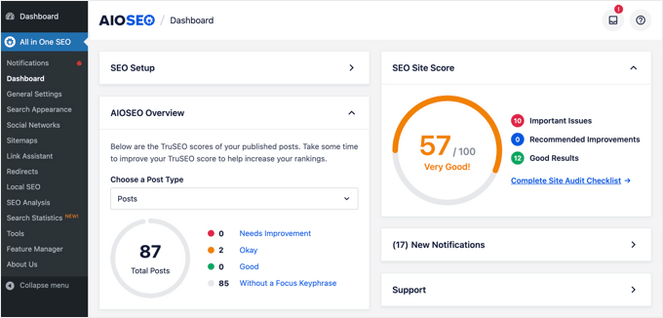
The AIOSEO dashboard is easy to understand and navigate. It immediately gives you an overview of your overall SEO Site Score with important issues that need to be fixed and recommended improvements.
From there, AIOSEO’s TruSEO On-Page Analysis becomes your main guide. Instead of leaving you to guess what’s missing, it gives you an actionable checklist for every post and page. It highlights things like missing meta descriptions, weak titles, opportunities to improve readability, and places where your content could be strengthened.
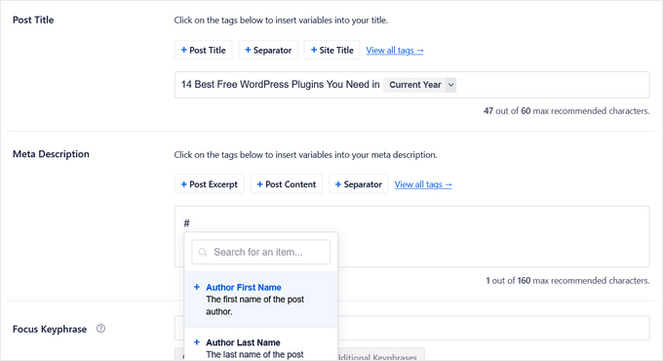
The Smart Meta Tag Generator is incredibly useful for bloggers. You can use dynamic variables—like the current year, author name, category, or custom fields—in your SEO titles and descriptions. That means you don’t need to manually update posts just to refresh your SEO titles.
AIOSEO also includes an Author SEO feature, which lets you create detailed author bios that highlight experience and expertise. This helps support Google’s E-E-A-T guidelines and gives readers (and search engines) more context about who’s behind your content.
Internal linking is handled smoothly with the Link Assistant. It spots opportunities you might miss, suggests relevant pages to link to, and lets you add links in bulk with just a few clicks. This helps your posts work together and makes your site structure stronger for both readers and search engines.
Social media previews are built in, too. You can see exactly how posts will look when shared on Facebook, Twitter, or Pinterest, and adjust images and descriptions before publishing to make the best first impression.
One of my favorite things is that AIOSEO tracks your performance right in your WordPress dashboard. The Search Statistics feature shows important blog metrics like search impressions, clicks, average click-through rate, and more.
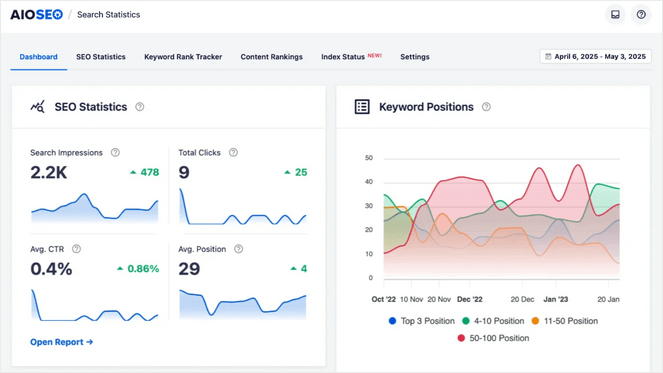
It even includes a Keyword Rank Tracker to analyze your keyword performance, identify top content, and monitor pages that are slipping in the rankings.
In addition, the plugin handles schema markup and smart XML sitemaps automatically. It can generate advanced schema types (like recipes, FAQs, products, courses, and more), which increases your chances of earning rich snippets in Google. The XML sitemap settings give you fine control over what gets indexed so search engines focus on the content you actually want to rank.
AIOSEO comes with even more powerful features than the ones I’ve listed in this review. This includes an SEO audit checklist, redirection manager, breadcrumbs, AI Writing Assistant, and much more.
For more information about this plugin, check out our full All in One SEO review.
| Pros of All in One SEO | Cons of All in One SEO |
| ✅ Beginner-friendly yet powerful enough for advanced SEO tasks | ❌ The free version is limited |
| ✅ Combines all essential SEO tools in one plugin, so you don’t need multiple add-ons | |
| ✅ Provides clear guidance to improve your site’s search performance | |
| ✅ Helps you optimize content, track rankings, and manage technical SEO from a single dashboard | |
| ✅ There’s a free version available |
Pricing: There is a free version of All in One SEO that gives you everything you need to get started with SEO. For more advanced features, you can upgrade to a premium plan, starting at $49.50 per year.
Why I Recommend All in One SEO: All in One SEO (AIOSEO) is my number one pick for bloggers seeking a robust SEO toolkit that’s both beginner-friendly and powerful. It has everything you need to optimize for SEO and track your progress.
2. Semrush: Best for Professional-Level Keyword Research & Competitor Insights
- Comprehensive keyword research with search volume, difficulty, and trends
- Competitor analysis with keyword gaps and traffic insights
- Backlink analysis with authority scores
- SEO Writing Assistant to optimize content
- Site audit tools to find SEO issues
- Social media monitoring and scheduling
- Integration with WordPress plugins like AIOSEO
- And more…
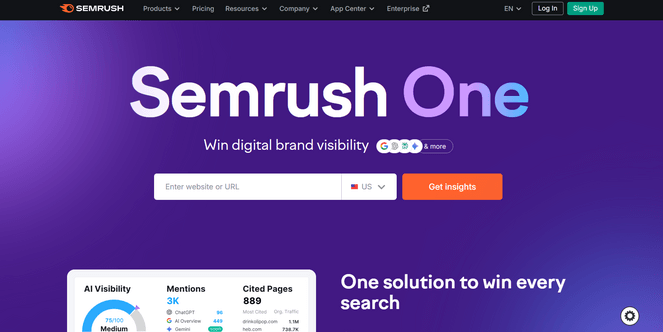
When I tested Semrush, I was blown away by how much data it gives you—keywords, competitors, backlinks, content gaps, you name it. It’s definitely built for serious SEO work.
If you want deep research, competitive insights, and an all-in-one SEO toolkit, SEMrush makes you feel like you’re operating at a professional level.
My Experience with Semrush
When I first opened Semrush, I was overwhelmed by how many features it offers. There are tools for keyword research, competitor analysis, backlink tracking, site audits, and even social media monitoring—all in one platform.
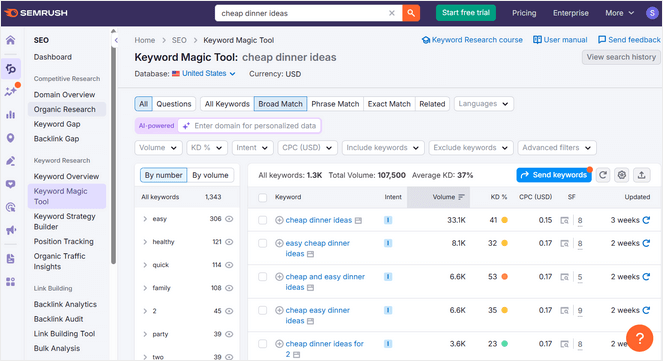
I started with the Keyword Magic tool. I typed in a seed keyword, and it returned thousands of related terms with search volume, keyword difficulty, and trend data. This made it easy to find long-tail keywords with real ranking potential.
The Keyword Gap tool was another standout. I entered my blog and a competitor’s URL, and it showed me keywords they were ranking for that I wasn’t. That alone gave me a list of new content ideas I could target.
I also used the SEO Writing Assistant to improve my content. It analyzed top-ranking pages and suggested keywords, readability improvements, and tone adjustments as I wrote. It felt like having an editor who understands SEO.
I liked how Semrush’s backlink analysis showed me who was linking to my competitors and helped me find opportunities to build my own backlinks. The data was thorough and included authority scores for each domain.
Plus, I appreciated that Semrush integrates with tools like AIOSEO. That made it easier to pull keyword data directly into my WordPress dashboard without switching between platforms.
| Pros of Semrush | Cons of Semrush |
| ✅ Provides comprehensive, professional-level SEO and competitive research data | ❌ Higher cost compared to other tools, which may not fit all budgets |
| ✅ Helps uncover new keyword opportunities and content gaps in your niche | ❌ Steep learning curve for new users unfamiliar with extensive data tools |
| ✅ Offers detailed backlink analysis to strengthen your link-building strategy | |
| ✅ Includes tools for site audits, content optimization, and tracking rankings | |
| ✅ All-in-one platform for bloggers serious about growing traffic and improving search performance |
Pricing: Starts at $165.17/month (billed annually), which is expensive compared to other SEO tools, especially if you’re just starting out or working with a limited budget. However, there is a free 7-day trial you can use to test the tool out.
Why I Recommend Semrush: Semrush gives you professional-level data for keyword research and competitor analysis. If you’re serious about growing your blog, SEMrush helps you make smarter decisions.
3. LowFruits: Best SEO Tool for Finding Low-Competition Keywords You Can Actually Rank For
- Identifies low-competition keywords for smaller blogs
- Prioritizes opportunities with real ranking potential
- Visual keyword analysis with color-coded SERP strength
- Keyword clustering to organize content topics
- Rank tracker to monitor keyword performance over time
- Sitemap extractor to analyze competitor content structure
- And more…
LowFruits takes a different approach to keyword research by focusing specifically on opportunities you can actually rank for. Instead of throwing thousands of keywords at you with high competition, it highlights weak spots in search results where smaller blogs have a real chance.
When I first opened LowFruits, I immediately noticed how visual and focused it felt compared to other keyword tools. The color-coded system made it easy to spot low-competition opportunities without getting lost in data.
My Experience with LowFruits
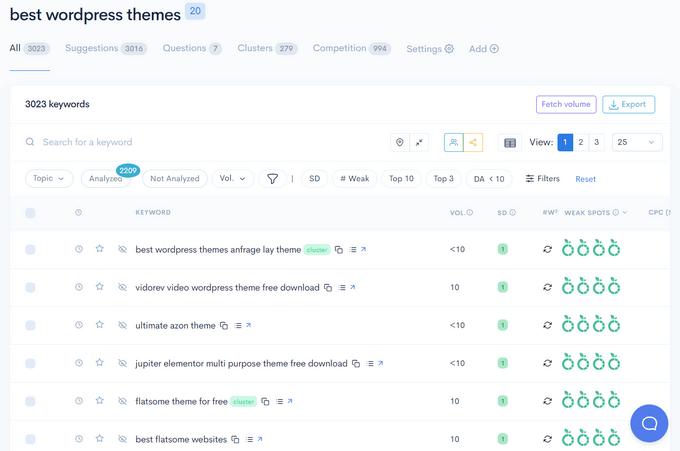
I started by entering a seed keyword related to my blog niche to see what opportunities LowFruits would find. Within seconds, it generated keyword ideas and color-coded each one based on SERP strength.
Green keywords meant weak competition, yellow meant moderate, and red meant strong authority sites dominated the results. I loved how this visual approach removed guesswork. Instead of analyzing dozens of metrics, I could instantly see which keywords were worth targeting.
The keyword clustering feature helped me group related terms into topic ideas. This made it much easier to plan content around a specific theme instead of writing random posts.
Once I found keywords worth targeting, I added them to the rank tracker tool. It monitored my positions over time so I could see which posts were gaining traction.
There’s also a Sitemap Extractor to analyze a competitor’s content structure. It pulled their entire sitemap and showed which topics they covered, helping me identify gaps in my own strategy.
| Pros of LowFruits | Cons of LowFruits |
| ✅ Easy interface for finding low-competition keyword opportunities | ❌ Limited advanced features compared to broader SEO suites |
| ✅ Color-coded SERP analysis reveals weak competition instantly | ❌ No free plan available, only a free trial |
| ✅ Keyword clustering makes topic planning easier | |
| ✅ Rank tracker monitors your keyword performance over time | |
| ✅ Sitemap Extractor analyzes competitor content structure |
Pricing: LowFruits starts at $37.50/month (billed annually). There’s also a free trial available.
Why I Recommend LowFruits: LowFruits stands out as an ideal tool for bloggers aiming to discover niche keywords and content opportunities without competing with major websites.
4. SEOBoost: Best for Bloggers Who Want Data-Driven Content Optimization
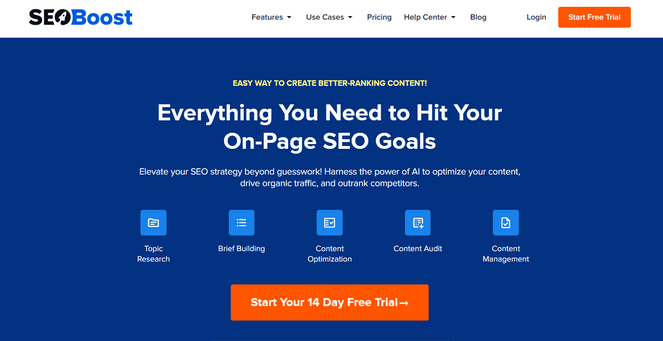
- AI-powered content optimization reports
- Clear, actionable recommendations for improving posts
- Topic reports with keyword suggestions based on top-ranking pages
- Content brief generator for article outlines
- Content audit tool to identify gaps and opportunities
- Integrated content management with calendar and campaign planner
- And more…
SEOBoost takes the guesswork out of creating content that ranks. Instead of wondering which keywords to target or how long your post should be, it analyzes the top-ranking pages and shows you exactly what to include.
I’ve used it to both plan new posts and improve older ones. The AI-powered reports made it easy to understand what was working for competitors and how to match (or beat) their approach.
My Experience with SEOBoost
When testing SEOBoost, I ran a Topic Report for one of my target keywords. The tool analyzed the top 30 ranking pages and gave me a clear breakdown: suggested word count, primary keywords, related terms, and even the headings competitors were using.
I appreciated how specific the recommendations were. Instead of vague advice like “use more keywords,” SEOBoost told me which exact phrases to include and how many times they appeared in top-ranking content.
The Content Brief Editor was especially helpful when starting a new post. I entered my keyword, and it generated a full article outline based on real SERP data. It saved me hours of research and gave me a solid structure to follow.
Once my draft was finished, I ran it through the Content Optimization tool. It pointed out missing keywords, weak areas, and places where I could add helpful related terms.
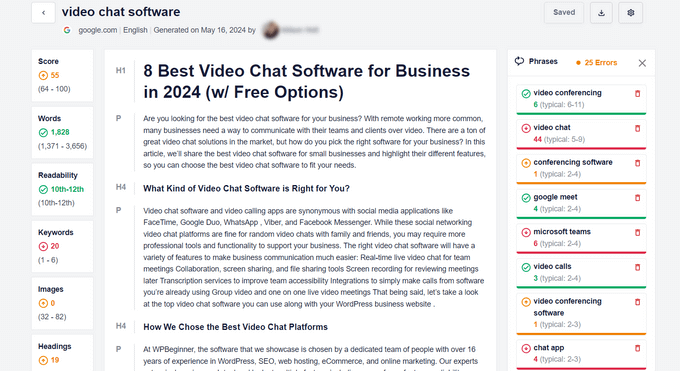
After making those updates, I felt much more confident that the post matched what Google is looking for.
I also liked the content management system, which includes a content calendar and campaign planner. It kept all my projects organized and helped me stay on top of deadlines without juggling spreadsheets.
| Pros of SEOBoost | Cons of SEOBoost |
| ✅ Useful for both new content and improving existing posts | ❌ Focuses only on content optimization, not other SEO aspects |
| ✅ AI-powered tool analyzes top-ranking pages for actionable insights | ❌ No free plan available, only a 14-day trial |
| ✅ Shows exactly which keywords and headings to include in your content | |
| ✅ Content audit identifies gaps and optimization opportunities | |
| ✅ User-friendly dashboard for beginners |
Pricing: SEOBoost starts at $22.50 per month (billed annually).
Why I Recommend SEOBoost: SEOBoost shines because it helps you optimize your content using real data from the top-ranking articles in search results, making it especially helpful for bloggers who want to improve their posts with guidance that actually reflects what’s working right now.
5. WPBeginner Keyword Generator: Best Free SEO Tool for Quick Keyword Brainstorming
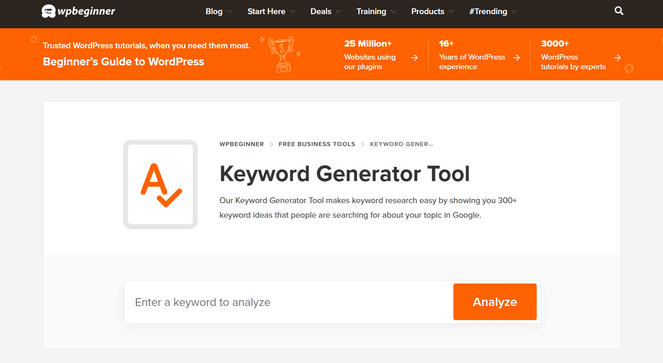
- Generates hundreds of keyword ideas from a single seed term
- Easy to use for beginners
- Web-based and completely free
- SEO topical entity graph for relevance insights
- CSV export for easy organization
- And more…
WPBeginner Keyword Generator is perfect when you’re stuck on what to write next. It takes one seed keyword and instantly generates hundreds of ideas based on real search patterns.
I’ve used it several times when planning blog content. It’s simple, fast, and removes the complexity that comes with most keyword research tools. Plus, it’s a totally-free, web-based tool!
My Experience with WPBeginner Keyword Generator
When I first tried the WPBeginner Keyword Generator, I was surprised at how fast it worked. I entered a seed keyword, clicked analyze, and got over 300 keyword ideas in seconds.
The tool breaks ideas into different search patterns. It shows keywords with prepositions, questions, and related terms people actually search for.
I liked the SEO topical entity graph feature. It helped me understand how relevant a particular keyword was to my main topic.
The simple interface made it easy to scan through ideas quickly. I didn’t have to learn a complicated dashboard or navigate through multiple screens.
I loved that I could also download the new keyword ideas to a CSV file. This made it simple to organize ideas for future blog posts.
Aside from the Keyword Generator, WPBeginner also offers other helpful free tools, including a Headline Analyzer to test different titles, a Keyword Density Checker to prevent over optimization, and a Website SEO Analyzer to check basic site health.
| Pros of WPBeginner Keyword Generator | Cons of WPBeginner Keyword Generator |
| ✅ Completely free SEO tool | ❌ Doesn’t provide metrics like search volume or keyword difficulty |
| ✅ Quickly generates 300+ keyword ideas for content planning | ❌ Limited features compared to other SEO tools |
| ✅ User-friendly approach removes complexity from keyword research | |
| ✅ Includes other free tools like Headline Analyzer and Website SEO Analyzer |
Pricing: FREE.
Why I Recommend WPBeginner Keyword Generator: WPBeginner Keyword Generator is free, easy to use, and pulls keyword ideas from real search data, making it especially helpful for bloggers who want to plan content around topics people are actually searching for.
Alternative: Answer the Public
6. Google Search Console: Best for Bloggers Who Want a Clear Look at Their Google Performance
- Tracks search queries driving traffic to your site
- Provides click, impression, and click-through rate metrics
- URL inspection tool for crawlability and indexing checks
- Submits sitemaps and individual URLs to Google
- Sends alerts for errors affecting site performance
- Free and direct from Google
- And more…
Google Search Console gives you the most accurate picture of how your blog performs in Google search. It’s built by Google, so the data comes straight from the source.
When I connected it to my blog, I immediately saw which keywords were already bringing traffic. That helped me focus on quick wins instead of guessing what to write next.
⭐ Note: If you use the premium version of AIOSEO, you can see valuable Google Search Console SEO statistics like keyword performance, content rankings, and more, right from your WordPress dashboard.
My Experience with Google Search Console
Setting up Google Search Console is fairly simple. I started by connecting my WordPress blog and submitting my sitemap, which allowed Google to start tracking my pages.
A few days later, I could see which search queries were driving traffic to my site. Some of the keywords were surprising—I was ranking for phrases I hadn’t even targeted.
The Performance report quickly became my favorite tool, giving a clear breakdown of clicks, impressions, and click-through rates for each page.
The URL Inspection tool was helpful for checking whether new posts were crawlable and ready to appear in search results. If a page didn’t index, I could submit it manually, and Google usually picked it up within hours.
I also set up alerts for crawl errors, so I was notified whenever Google had trouble accessing a page, allowing me to fix problems right away.
| Pros of Google Search Console | Cons of Google Search Console |
| ✅ Shows real data directly from Google | ❌ Takes time to learn all the features |
| ✅ Reveals which queries bring traffic to your site | ❌ Doesn’t give you suggestions on what to fix |
| ✅ Helps you find indexing problems fast | |
| ✅ Lets you submit sitemaps and URLs for crawling | |
| ✅ Completely free with no limits |
Pricing: FREE.
Why I Recommend Google Search Console: Google Search Console is a free tool that offers valuable insights straight from the source—Google—making it an essential tool for bloggers optimizing for better search performance.
7. Yoast SEO: Best for Bloggers Who Want Straightforward, On-Page SEO Guidance
- On-page SEO analysis with actionable suggestions
- Readability checker for clarity and structure
- Meta description and title optimization with snippet preview
- Open Graph metadata to control social sharing
- XML sitemaps for indexing
- Local SEO, News SEO, and Video SEO add-ons
- And more…
Yoast SEO is a popular SEO plugin that works well if you want to keep your SEO clean and simple. It gives you the basics you need to optimize each post without overwhelming you with extra tools.
I used Yoast before switching to AIOSEO, and it kept my content structure consistent. Setup was quick, and the dashboard made it easy to see what needed fixing.
My Experience with Yoast SEO
When I installed Yoast, the setup wizard walked me through the basics. It asked simple questions about my site and configured settings automatically.
Once I started writing, the on-page analysis appeared right below the editor. It showed me which SEO elements were missing or needed improvement in real time. I liked how the readability checker highlighted long sentences and passive voice. It helped me break up paragraphs and make my writing clearer.
The plugin also suggested improvements for my SEO titles and meta descriptions. I could see a preview of how my post would look in Google search results before hitting publish.
In addition, Yoast handles some technical SEO tasks automatically. For example, it creates XML sitemaps and adds schema markup without extra setup, which kept my site search-engine friendly.
Overall, after using Yoast, I’ve found that All in One SEO is not only easier to use but also offers more features. For a full comparison, you can see our other article on Yoast vs. All in One SEO.
| Pros of Yoast SEO | Cons of Yoast SEO |
| ✅ Provides clear guidance on improving SEO for each post | ❌ Fewer features in the free version compared to competitors like AIOSEO |
| ✅ Helps maintain consistency in content optimization | ❌ The premium version is needed for more advanced features |
| ✅ Covers SEO basics like XML sitemaps | |
| ✅ Set Open Graph metadata to control how content appears on social media | |
| ✅ News SEO and Video SEO addons included |
Pricing: There is a free version of Yoast you can download. Yoast SEO Premium starts at $9.90 per month.
Why I Recommend Yoast SEO: Yoast SEO keeps on-page optimization simple and consistent, making it easy to follow for beginners. While I prefer All in One SEO for its more comprehensive features, Yoast remains a reliable choice that covers all the essentials.
8. Ahrefs: Best SEO Tool for Competitor Research and Backlink Analysis

- Competitor keyword analysis and organic traffic insights
- Backlink explorer with authority scores and anchor text analysis
- Content Explorer to discover trending articles and popular topics
- Site Audit tool to find SEO issues like broken links and missing meta
- Rank tracker for keyword performance
- Alerts for new backlinks or competitor activity
- And more…
Ahrefs instantly impressed me with how strong it is for backlink analysis and competitor research. If you want to see what keywords competitors are ranking for and understand their content strategy, this tool gives you everything you need in one place.
I liked how easy it was to pull up detailed keyword data and see what’s working for sites in my niche. It’s powerful, fast, and packed with data that actually helps you make decisions.
My Experience with Ahrefs
When I first logged into Ahrefs, the dashboard felt professional and data-rich. Everything I needed was organized clearly, so I could jump straight into research.
I really love the Content Explorer feature. I used it to search for topics in my niche, and it showed me the most shared and linked-to articles. This helped me discover proven content ideas and understand what readers were engaging with.
The competitor analysis tools were especially revealing. Entering a competitor’s domain showed their top-ranking keywords, estimated organic traffic, and backlink profile, highlighting exactly which keywords were driving their traffic.
Backlink analysis stood out as well. I could see every site linking to competitors, along with authority scores and anchor text, which made identifying link-building opportunities much simpler.
Ahrefs also has Site Audit feature that scanned my blog and flagged SEO issues like broken links, missing meta descriptions, and slow-loading pages. The reports were detailed yet easy to understand, clearly showing what needed fixing.
| Pros of Ahrefs | Cons of Ahrefs |
| ✅ Excellent for competitive analysis and keyword tracking | ❌ Higher cost may not be suitable for smaller budgets |
| ✅ Powerful content discovery tools for topic exploration | ❌ May overwhelm beginners not familiar with extensive data tools |
| ✅ Extensive database for backlink analysis | |
| ✅ Rank tracker to monitor keyword positions | |
| ✅ Site audit feature to find SEO issues |
Pricing: Starts at $108 per month (billed annually). There’s also free trial available.
Why I Recommend Ahrefs: Ahrefs is a great solution for bloggers who want a powerful, data-driven tool to dive deep into SEO and competitor research. It makes it easier to understand what’s working in your niche and plan content that can attract traffic and grow your audience.
9. SEOPress: Best for Bloggers Who Value Privacy and Simplicity
- Privacy-focused plugin with no user tracking
- Content analysis for titles, meta descriptions, and keywords
- Schema integration for FAQ and Article rich snippets
- Redirect manager for smooth URL changes
- XML and HTML sitemap generation
- Alerts for missing SEO elements
- And more…
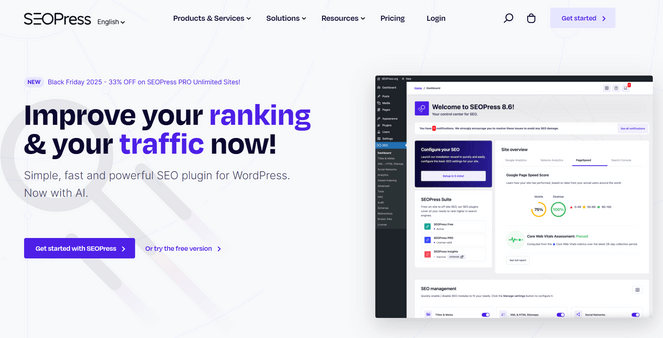
SEOPress is perfect for bloggers who want a straightforward, privacy-friendly SEO plugin. It handles all the essentials without tracking your data, but it also includes enough advanced features to support you as your blog grows and your SEO needs become more complex.
I tested it on a demo site and immediately appreciated how smooth everything felt. The setup was quick, it ran fast, and it’s nice that the free version never tried to push extra features or upsells the way some other plugins do.
My Experience with SEOPress
When I installed SEOPress, the first thing I noticed was how clean the dashboard looked. Everything felt organized and easy to find.
I used the content analysis tool to check a blog post. It showed clear suggestions for improving titles, meta descriptions, and keyword usage.
The schema integration stood out because it let me add rich snippets without touching code. I set up FAQ and Article schema in just a few clicks.
I also tested the redirect manager when I changed a few URLs. It handled 301 redirects smoothly and kept traffic flowing to the right pages.
SEOPress generated XML and HTML sitemaps automatically. I didn’t have to configure anything extra to get them working with Google Search Console.
One feature I appreciated was the alert system. It sent me notifications about missing meta descriptions and other SEO issues I might have missed.
| Pros of SEOPress | Cons of SEOPress |
| ✅ Clean, user-friendly interface without unnecessary bloat | ❌ Fewer advanced features than other SEO plugins like AIOSEO |
| ✅ Excellent for privacy-focused users as it does not track user data | ❌ You only need one SEO plugin, so you can’t use it alongside of AIOSEO or Yoast |
| ✅ Affordable pricing for solid SEO features | |
| ✅ There’s a free version available |
Pricing: SEOPress starts at $49 per year. There’s also a free version available to download.
Why I Recommend SEOPress: SEOPress is simple and respects your privacy. It handles essential SEO tasks without slowing down your site. Remember, you only need one WordPress SEO plugin on your site though, so I recommend AIOSEO over SEOPress.
10. Rank Math: Best for Bloggers Wanting a Strong Free SEO Option
- Setup wizard for easy configuration
- Automated SEO sitemaps
- Real-time SEO recommendations in post editor
- Schema markup support
- Keyword rank tracker within WordPress
- AI-powered content assistant
- And more…
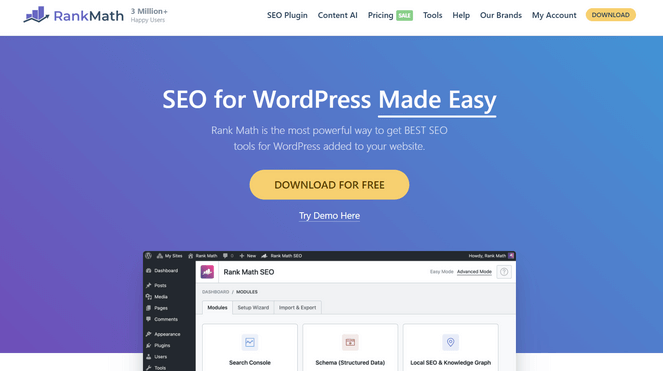
Rank Math stands out as a powerful and flexible SEO solution in a single plugin. It’s ideal for bloggers who want advanced features without a steep learning curve.
The setup wizard handles most of the initial configuration, and the interface feels modern, fast, and easy to use. Plus, the free version includes many professional-level features, making it a great option for bloggers on a budget.
My Experience with Rank Math
When I first tested out Rank Math, the setup wizard guided me through the entire configuration step by step. It connected my Google Search Console and set up sitemaps, making it quick to get started with solid SEO foundations.
In the dashboard, the visual interface used color-coded indicators to show SEO health at a glance: green for good, yellow for areas needing attention, and red for issues that required immediate fixes.
I like how real-time SEO recommendations appeared directly in the post editor as I wrote, with clear, actionable suggestions that made it easy to improve content immediately.
Adding schema markup was also simple. I selected the content type from a dropdown and filled in a few fields, and Rank Math handled the rest.
Plus, the keyword rank tracker let me monitor my posts’ performance in search results directly from WordPress, eliminating the need for external tools.
| Pros of Rank Math | Cons of Rank Math |
| ✅ User-friendly interface with visual guidance | ❌ You can only use one primary SEO plugin at a time, so you can’t use Rank Math with AIOSEO |
| ✅ Setup wizard handles configuration automatically | ❌ The free plugin is missing some advanced features |
| ✅ Automated SEO sitemaps and easy schema markup | |
| ✅ Built-in keyword rank tracker monitors performance | |
| ✅ Powerful features in the free version |
Pricing: There is a free version of Rank Math that you can use. For more advanced features, you can upgrade to a premium plan, starting at $4.08/month (billed annually).
Why I Recommend Rank Math: Rank Math offers powerful SEO tools in its free version, making it a great choice for bloggers who want advanced features without paying anything upfront. The setup is quick, and the interface is intuitive, so you can start optimizing your site right away.
Bonus. MonsterInsights: Best WordPress Analytics Plugin to Improve Your SEO Strategy
- Quick Google Analytics setup in WordPress with no coding required
- Search Console reports inside WordPress to view top keywords and clicks
- Page and post insights to see how individual articles perform
- Author, category, and tag tracking to guide content strategy
- Scroll tracking to understand reader engagement
- Focus keyword tracking when used with AIOSEO or Yoast
- Real-time stats for monitoring traffic changes instantly
- And more…
If you want to understand which content performs best—and why—MonsterInsights is a must-have. It’s the leading Google Analytics plugin for WordPress and gives you clear, actionable insights right inside your dashboard.
While it’s not an SEO plugin, the data it provides makes your SEO decisions significantly easier.
MonsterInsights shows you exactly where your traffic comes from, which keywords and landing pages perform well, and how visitors interact with your site. This helps you double down on what’s working and fix what isn’t. To learn more, see our detailed MonsterInsights review.
After installing and activating the plugin, the setup wizard guides you through connecting your site to Google Analytics. Once your data starts flowing in, you’ll see reports automatically inside WordPress—no need to open the Google Analytics 4 interface.
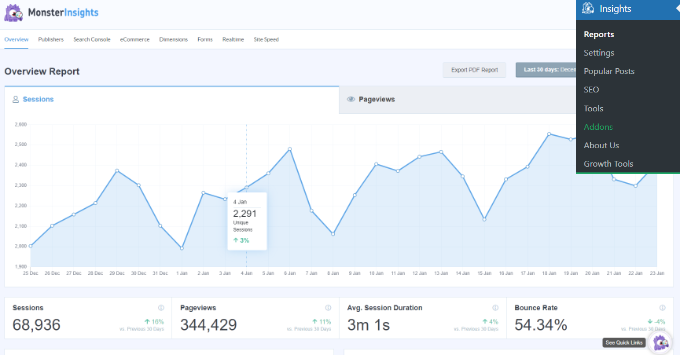
For step-by-step instructions, see our guide on how to see Google Analytics stats in your WordPress dashboard.
Here are some actionable tips for using MonsterInsights to boost your WordPress blog traffic:
- Use the Search Console report to discover keywords your site is already ranking for, then optimize titles, meta descriptions, and add related keywords to boost visibility.
- Monitor your top landing pages to identify high-traffic posts and refresh them with updated information, stronger CTAs, and improved internal linking.
- Track scroll depth to see how far readers make it through your posts and identify where they lose interest, then restructure your content to keep them engaged longer.
- Review outbound link tracking to understand which external resources your readers click most, helping you find new content ideas or partnership opportunities.
- Check the eCommerce and affiliate tracking reports (if relevant) to see which pages generate the most revenue so you can drive more SEO traffic to high-value posts.
The best part? There’s even a free version of MonsterInsights that you can use to get started.
WordPress SEO Plugin FAQs
What is the best free SEO plugin for WordPress?
All in One SEO is one of the best free SEO plugins available. It offers powerful on-page analysis and beginner-friendly tools to help you optimize your content right from your WordPress dashboard—without needing to upgrade to get started.
Do I need a paid SEO tool if I’m just starting my blog?
Not right away. Free tools like AIOSEO Lite, Google Search Console, and the WPBeginner Keyword Generator can help you get started without spending money.
Can I use multiple SEO plugins on my WordPress site at the same time?
No. You should only use one main SEO plugin like AIOSEO, Yoast, or Rank Math to avoid conflicts.
What’s the difference between an SEO plugin and an SEO tool?
An SEO plugin works directly inside your WordPress dashboard (like AIOSEO), helping you optimize your site from within. An SEO tool, on the other hand, is typically browser-based (like SEMrush or Ahrefs) and focuses on research, tracking, and competitor analysis outside of your site.
Is Google Search Console enough for SEO?
Google Search Console shows you how your site performs in search, but you’ll still need an SEO plugin, such as All in One SEO, to optimize your posts and pages.
Which SEO tool is best for keyword research?
Semrush offers the most detailed keyword data, but LowFruits is better if you want to find easy-to-rank keywords quickly.
What Is the Best SEO Plugin or Tool for Bloggers?
After reviewing all of the plugins and tools, I strongly believe that All in One SEO (AIOSEO) is the best SEO plugin for most bloggers. It combines beginner-friendly setup with powerful features like TruSEO analysis, built-in keyword tracking, and schema markup—all in one plugin.
Plus, there’s a free version of AIOSEO that you can use to get started.
If you need deep competitive research and keyword strategy, Semrush is your best option. For bloggers focused on finding low-competition keywords fast, LowFruits makes that process visual and simple.
I hope this article helped you find the best SEO tools to explode your blog traffic. But if you’d like to learn more, check out our expert guides on SEO tips for bloggers, and how to get more traffic to your blog.
And don’t forget to sign up for our email newsletter for more helpful blogging tips!
There are too many free and paid SEO tools. As I see in the post it is explained descriptively with the information about SEO tools in a way that marketers can understand it easily. This would be very helpful for the audience knowing about latest and best SEO tools.
Thanks for sharing
Hey,
It’s really amazing.
In your blog, you have perfectly explained SEO tools seep by step. It was very helpful for me, and I really liked it.
Thank you
That was an informative post. Past few weeks, I was searching for an ideal keyword tracking tool to track my keyword performance. Most of the tools you mentioned were totally new to me. Thanks for sharing the awesome these tools. I recently used a Serp ranking tool, Serpple. You can also explore the tool to track the keyword ranking data.
I’m beginner in web building process so thanks to sharing with us this info.
That was an amazing blog and a great list to consider. I have also heard about Postifluence. Please share your thoughts on this tool as well.
Great article. Keep writing. I have bookmarked your page.
Nice blog. it’s very informative information about SEO. thanks for sharing the tool of SEO to explore your website traffic.
Informative Article…Thanks for Sharing
All are good SEO tools, But i personally use MOZ, Ahrefs, SEMRush, Google search console, Buzzsumo, Kissmetrics and Lynda.
What an insightful roundup of SEO tools! Your list of the top 10 tools is incredibly helpful for bloggers looking to supercharge their traffic in 2023. I’ve personally used a few of these tools, and they’ve made a significant difference in optimizing my content and improving overall visibility
Very informative article! SEO is constantly evolving, and having the right tools can make a huge difference. Great recommendations.
Laptop Service Center in Hyderabad