

A s a blogger, I need my readers to find the content they're looking for on my WordPress site. So one day, I decided to test the default WordPress search to see how well it actually worked.
I typed in keywords for articles I knew existed, but the search kept showing irrelevant results or nothing at all. That’s when I realized the built-in WordPress search just wasn’t good enough.
Here’s the thing: a bad search experience doesn’t just annoy your visitors—it actually costs you money. When people can’t find what they’re looking for, they leave your site and might not come back. You lose potential revenue, email subscribers, and chances to grow your audience.
That’s why I spent several weeks testing the top WordPress search plugins to find the ones that actually deliver results. I looked at search accuracy, speed, how easy they are to set up, and helpful features like filters and analytics.
In this post, I’ll share the 9 best WordPress search plugins that will help your visitors find exactly what they need—so you can keep them on your site longer and turn more of them into loyal readers or customers.
Quick Picks: Best WordPress Search Plugins
If you don’t have time to read the full reviews, check out this overview of my top 5 picks to quickly find the perfect search plugin for your needs:
| # | Plugin | Best For | Starting Price |
| 1 | SearchWP | All-in-one WordPress search | $99/yr |
| 2 | ElasticPress | Ultra-fast search for large sites | $29/mo + Free |
| 3 | Ivory Search | Free customizable search forms | Free + $19.99/yr |
| 4 | WPFilters | Amazon-style search filters | $49/yr |
| 5 | SearchWP Live Ajax Search | Instant, real-time search results as you type | Free |
Benefits of WordPress Search Plugins
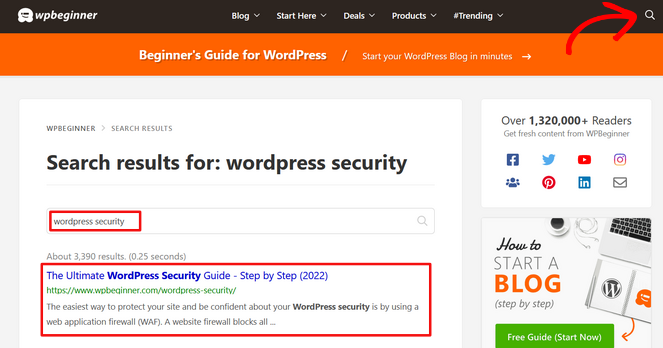
As I mentioned earlier, the default WordPress search is surprisingly limited. It only searches post titles and basic content, which means it often misses things like categories, tags, custom fields, metadata, and more.
This isn’t a big issue if your blog is new and you’ve only published a few articles. But as your site grows and you publish many blog posts, you’ll want visitors to quickly find the relevant content they need.
While you can apply blog SEO best practices to help people find your content in search engines, that doesn’t help those already browsing your site.
However, with a WordPress search plugin, visitors to your site can type a couple of keywords into the search bar and get accurate results instantly.
With better search functionality, you can:
- Help visitors find relevant content faster, keeping them on your site longer
- Reduce bounce rates by showing accurate search results
- Track what people are searching for to discover content gaps
- Improve conversions by making products easier to find
- Provide instant search results without page reloads
- Filter and sort results like major eCommerce sites
A better search experience means happier visitors, more engagement, and ultimately more revenue from your WordPress site.
How I Test and Review WordPress Search Plugins
I didn’t just skim feature lists for this review. I actually installed each plugin on real WordPress sites and tested them the way you would—searching for content, adjusting settings, and seeing how they performed under normal use.
Here’s what mattered most during my testing:
- Ease of Setup: Could I get it running quickly without digging through documentation or hiring a developer? Some plugins were ready in minutes, while others had me scratching my head.
- Search Accuracy: I typed in search terms I knew should return specific posts. Did the plugin find them? Were the results actually relevant?
- Speed and Performance: Nobody wants a search bar that takes forever to load results. I tested how fast each plugin delivered results and checked whether it bogged down my site.
- Advanced Features: Live search, analytics, product filtering—I tried the extras to see which ones actually made a difference versus which were just marketing fluff.
- Customization Options: How easy was it to make the search form match my site’s design? Could I control what content gets included without touching code?
- Pricing and Value: For paid plugins, I asked myself: “Would I actually pay for these premium features, or does the free version do enough?”
Some plugins impressed me right away. Others looked great on paper but felt clunky in practice. This hands-on approach helped me figure out which ones are actually worth your time.
Now that you know why better site search features are so important, let’s dive into this list of the best search plugins for WordPress.
1. SearchWP: Most Powerful All-in-One WordPress Search Plugin

- Easy to set up and use for an easy boost to your users' search experience
- Searches everything including product details, shortcodes, custom post types, and more
- Use keyword stems instead of exact term matches
- Easy algorithm customization
- Ability to exclude content from results
- View search statistics and insights
- Integrates with WooCommerce and Easy Digital Downloads
- And more…
When I first tested SearchWP on my blog, I was impressed by how much it improved search results right away. The default WordPress search feels like it’s stuck in 2010, but SearchWP brings it into the modern era.
Overall, it’s a powerful plugin that fixes WordPress search problems without requiring any coding knowledge. It also provides valuable insights into what your visitors are actually looking for.
My Experience with SearchWP
After installing SearchWP, the setup process was super straightforward. The plugin asked me a few simple questions about what I wanted to search, and then it was ready to go.
The first thing I noticed was how much deeper SearchWP searches compared to default WordPress. It found content hidden in custom fields, PDFs I’d uploaded, and even WooCommerce product descriptions that WordPress search completely ignored.
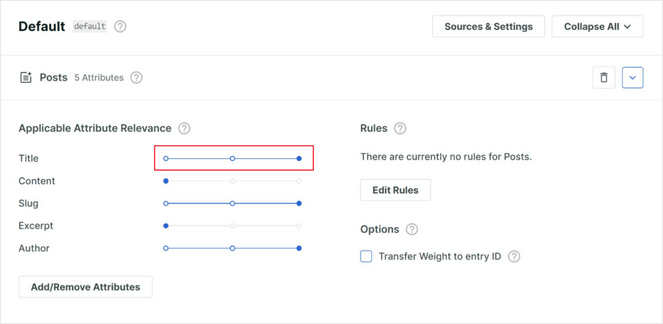
What really sets SearchWP apart is the custom relevance algorithm. Instead of just showing results in chronological order, I could use simple sliders to tell the plugin what matters most. I gave more weight to post titles than content, which meant visitors searching for specific topics got better matches.
The smart learning feature is brilliant. Over time, SearchWP tracks which results people actually click on and adjusts future rankings accordingly. Good content naturally rises to the top based on real user behavior, not just my guesses about what should rank well.
I also loved the search analytics dashboard. It shows exactly what visitors are searching for, which searches return no results, and which content gets clicked most often. This gave me valuable insights into content gaps on my site—I discovered several topics people were searching for that I hadn’t covered yet.
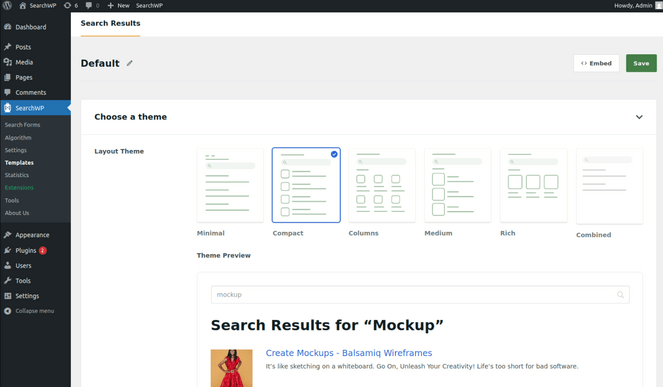
The search forms and results templates worked perfectly out of the box. I didn’t need to mess with styling or layout because everything looked professional right away.
Plus, SearchWP handles WooCommerce products seamlessly, searching through SKUs, product variations, and custom product fields. For anyone running an online store, this feature alone makes it worth the investment.
| Pros of SearchWP: | ✅ Easy to set up and start using ✅ Enhances default WordPress search to include more content types ✅ Search features like autocomplete, fuzzy search, and related content ✅ Provides analytics for search terms and user behavior ✅ Learns and improves search result relevance over time |
| Cons of SearchWP: | ❌ No free version available |
Pricing: Starts at $99/year.
Why I Recommend SearchWP: SearchWP transforms WordPress search from frustratingly limited to genuinely useful. It searches everything on your site, learns from user behavior, and provides analytics that help you create better content. For serious bloggers and site owners, it’s worth every penny.
2. ElasticPress: Best for Lightning-Fast Search on Large, High-Traffic Sites
- Instant Results feature bypasses WordPress for fast search results
- Ability to search within documents like PDFs, Word files, and presentations
- Easy weighted results dashboard
- Autosuggest to guide users during search
- Related posts suggestions to improve navigation
- WooCommerce integration for smooth product filtering
- And more…
When I tested ElasticPress, I was blown away by the speed. The plugin claims to be up to 10 times faster than regular WordPress search, and I actually believe it.
If you’re running a large WordPress blog with thousands of posts or a busy WooCommerce store, ElasticPress delivers the kind of performance you’d expect from major websites like Amazon or eBay.
My Experience with ElasticPress
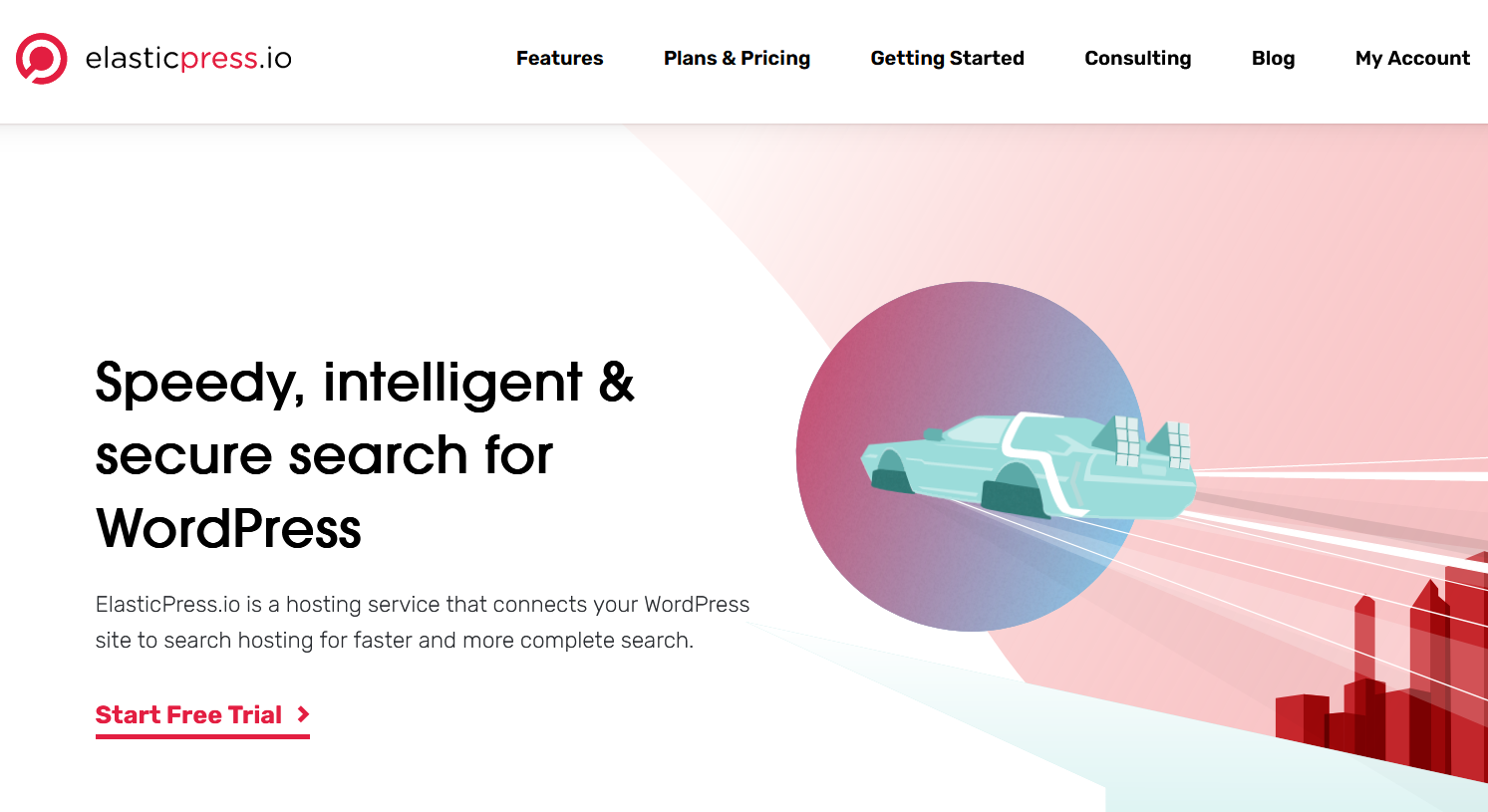
Setting up ElasticPress requires choosing between ElasticPress.io hosting or running your own Elasticsearch server. I opted for the ElasticPress.io route since I didn’t want to manage server infrastructure myself.
The “Instant Results” feature is what makes this plugin special. It completely bypasses WordPress to deliver search results, which means searches happen almost instantaneously—even on sites with massive amounts of content.
I tested the autosuggest feature by typing partial queries, and it immediately showed relevant suggestions. This guided users toward the content they wanted before they even finished typing.
The document search capability impressed me. I uploaded several PDFs and Word documents to test it, and ElasticPress indexed the content inside those files perfectly. Visitors could find information buried in downloadable resources, not just regular posts and pages.
The weighted results dashboard made it easy to prioritize certain content types without touching code. I gave more weight to newer posts in certain categories while keeping evergreen content highly ranked in others.
For WooCommerce sites, the filtering integration is excellent. Product searches felt smooth and responsive, with filtering options that didn’t slow down the page at all.
| Pros of ElasticPress: | ✅ Significantly speeds up and improves search functionality by using Elasticsearch ✅ Keeps your site fast by handling searches on their servers instead of yours ✅ Enhances user experience with instant results and autosuggestions ✅ Excellent WooCommerce support for product filtering |
| Cons of ElasticPress: | ❌ Expensive compared to other search plugins ❌ Best suited for larger sites, possibly overkill for smaller sites |
Pricing: Starts at $29/month.
Why I Recommend ElasticPress: I recommend ElasticPress for large WordPress sites and WooCommerce stores that need blazing-fast search at scale. If your site has thousands of posts or products and you need enterprise-grade performance, this is the best option available.
3. Ivory Search: Best Free Search Plugin for WordPress

- Create unlimited search forms
- Configure and customize each search form separately
- Search WooCommerce products, images, files, attachments, and more
- Track searches in search analytics
- Exclude specific content from search results
- And more…
Ivory Search is a free WordPress search plugin that lets you create as many different search forms as you want and set up each one to search different things.
One form could search products, another could search blog posts—whatever you need. For small bloggers and site owners who want complete control over their search functionality, Ivory Search delivers flexibility without overwhelming you.
My Experience with Ivory Search
When I first installed Ivory Search, I appreciated how the plugin didn’t force me into one search approach. Instead, it gave me the tools to create custom search forms for different purposes.
I created one search form specifically for my blog posts and another for searching downloadable resources. Each form could be configured independently with its own settings, which meant I could fine-tune the experience for different sections of my site.
Adding a search bar to my navigation menu took just a couple of clicks through the WordPress menu editor.
The live AJAX search feature worked great without any complicated setup. As soon as visitors started typing, results appeared below the search bar in real-time. No page reloads, no waiting.
The theme customizer support made it easy to match the search form styling to my site’s colors and design. I adjusted the colors, fonts, and layout without touching any CSS.
One thing to note: the interface can feel a little confusing at first if you’re a beginner. There are a lot of options, and it might take some time to understand all the settings. But once you get the hang of it, the flexibility is worth it.
| Pros of Ivory Search: | ✅ Free to use, providing control over site search without cost ✅ Allows customization of search functionality across different site sections ✅ Compatible with WooCommerce for product search ✅ Seamlessly integrates with popular translation plugins like WPML, Weglot, and more |
| Cons of Ivory Search: | ❌ Interface can be a little confusing for beginners at first ❌ Advanced features require the premium version |
Pricing: Ivory Search is a free plugin. There’s also a premium version that starts at $19.99/year.
Why I Recommend Ivory Search: Ivory Search stands out by offering highly customizable search options that integrate seamlessly with WordPress and WooCommerce, making it a great choice for bloggers seeking tailored search experiences without breaking the bank.
4. WPFilters: Best Search Plugin for Amazon-Style Filters

- Enhanced sorting flexibility similar to e-commerce sites
- Drag-and-drop filter blocks to add filtering to any page
- Filter options for blog posts, products, downloads, categories, pricing, and ratings
- Nested categories that let visitors drill down gradually
- Shareable URLs for filtered search results
- Compatible with both regular WordPress search and SearchWP
- And more…
WPFilters fixes something you might not realize is a problem—helping people actually sort through search results. It’s made by the same team as SearchWP, and it adds those filtering options you see on Amazon where visitors can click checkboxes for categories, slide a bar for price ranges, or pick ratings.
If you’ve ever wished your WordPress site had the kind of advanced filtering you see on major eCommerce platforms, WPFilters delivers exactly that.
My Experience with WPFilters
After installing WPFilters, I was impressed by how easy it was to add filters using regular WordPress blocks. No coding required—just drag the filter blocks onto any page where I wanted filtering to appear.
I created a page with product filters that let visitors select multiple categories, set price ranges with a slider, filter by customer ratings, and more. The interface felt clean and professional, just like you’d expect on a major shopping site.
The nested categories feature is particularly helpful. Instead of overwhelming visitors with every possible option at once, it lets them drill down gradually. They might start by selecting “Electronics,” then “Headphones,” then “Wireless Headphones”—each choice refining the results further.
One of my favorite features is that filtered results create shareable URLs. When visitors apply specific filters, the URL updates to reflect their choices. This means they can bookmark their exact search or share it with others, which is incredibly useful for curating specific product lists or content recommendations.
WPFilters includes thoughtful UX features like collapsible sections, result counts for each filter option, and show/hide toggles that keep the filtering interface clean and uncluttered.
One thing to keep in mind: WPFilters doesn’t improve search relevancy on its own—it enhances the filtering and display of search results. For the best experience, use it alongside a strong search solution like SearchWP.
| Pros of WPFilters: | ✅ Adds Amazon-style advanced filtering options without needing coding skills ✅ Filters any content type on your site ✅ Better user experience through collapsible sections and clean organization ✅ Allows users to share and save specific search results ✅ Seamlessly integrates into existing WordPress setups |
| Cons of WPFilters: | ❌ Does not improve search relevancy on its own, works best alongside another search plugin |
Pricing: Starts at $49/year. Or, you can get the All Access Bundle which includes SearchWP and WPFilters for $399/year.
Why I Recommend WPFilters: WPFilters provides advanced, eCommerce-style search filtering capabilities to WordPress, significantly improving how users can refine search results to find exactly what they’re looking for. It’s especially valuable for WooCommerce stores and content-heavy sites.
5. SearchWP Live Ajax Search: Best for Instant, Real-Time Search Results As You Type
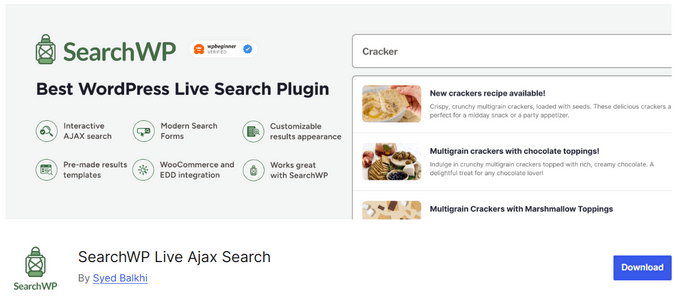
- Zero setup required, simply activate it
- Instant search results displayed through an AJAX-powered dropdown
- Ready-made layout templates and basic customization options
- WordPress block to add it anywhere on your site
- Integrates with any WordPress theme
- And more…
SearchWP Live Ajax Search is another free search plugin that gives you instant search results as you type. In real-time, the results appear in a dropdown below the search bar—no page loads required.
If you want to make your search feel more modern and instant, this free add-on is worth trying.
My Experience with SearchWP Live Ajax Search
When I activated SearchWP Ajax Live, I didn’t need to configure anything. The plugin worked immediately with my existing SearchWP installation.
As soon as I started typing in the search box, results appeared in a clean dropdown below it. The experience felt smooth and professional—exactly like what you’d expect from a modern website.
The plugin comes with ready-made layout templates that look good right out of the box. I tested a few different template options and found one that matched my blog design perfectly.
I appreciated that SearchWP Ajax Live uses WordPress blocks, which meant I could add the search form anywhere on my site—in the header, sidebar, footer, or even within content using the block editor.
The customization options are basic but work well enough. I could adjust colors and styling to match my theme without diving into complicated settings.
One important note: SearchWP Ajax Live is designed to work with SearchWP, though it also supports other search plugins that use WordPress template tags.
This plugin also doesn’t improve search functionality itself—it only adds the live search interface. You’ll still need a solid search plugin like SearchWP to handle the actual searching.
| Pros of SearchWP Live Ajax Search: | ✅ Provides a modern, responsive search interface ✅ Improves site navigation with real-time search results ✅ Super easy setup ✅ Free to use |
| Cons of SearchWP Live Ajax Search: | ❌ Only adds live search, doesn’t improve search functionality ❌ Limited customization options |
Pricing: SearchWP Live Ajax Search is free.
Why I Recommend SearchWP Live Ajax Search: It’s the fastest and simplest way to add live search to a WordPress site. If you don’t need a full search redesign but want your users to see results instantly as they type, SearchWP Ajax Live is a free tool that delivers.
6. FiboSearch: Best for WooCommerce-Focused Search with Product Previews

- Search by product SKU, product title, and long and short descriptions
- Show product image, price, and other details in live search results
- Ability to limit displayed suggestions
- Group instant search results by type
- Support for WooCommerce search results page and Google Analytics
- And more…
FiboSearch is a great plugin for WooCommerce search. It’s built to make product discovery as simple and seamless as possible, helping your visitors find exactly what they’re looking for without extra effort.
If you’re running an online store and want to improve the shopping experience, FiboSearch is designed specifically for that purpose.
My Experience with FiboSearch
When I tested FiboSearch on a demo WooCommerce store, the installation and setup took just a few minutes. Adding the search form to my navigation menu required only a couple of clicks.
The live search suggestions appeared instantly as I typed product names. But what really impressed me was the Details Panel feature.
When I hovered over a product in the search results, a larger panel slid out showing the product image, full description, price, SKU, stock status, and an “Add to Cart” button. Visitors could add products to their cart without ever leaving the search interface or navigating to the product page.
This streamlined shopping experience reduces friction and makes impulse purchases easier—which is exactly what you want for conversions.
The search functionality goes deep into WooCommerce data. I could search by product title, description, SKU, product variations, categories, tags, and even custom product attributes.
The mobile design impressed me too. FiboSearch automatically optimizes the search interface for smartphones, making it easy for mobile shoppers to find products quickly.
The free version works well for smaller stores, but the Pro upgrade gets you the super-fast search engine that can handle stores with 100,000+ products without slowing down. For large stores, this performance boost is essential.
| Pros of FiboSearch: | ✅ Improves WooCommerce search functionality and adds product detail previews ✅ Lets shoppers take quick actions, like adding to cart, directly from search ✅ Supports fuzzy search and synonyms ✅ Scalable for large product inventories without performance issues |
| Cons of FiboSearch: | ❌ Advanced features may require a paid upgrade ❌ Designed primarily for WooCommerce-powered sites |
Pricing: FiboSearch is free. There’s also a premium version that starts at $59/year.
Why I Recommend FiboSearch: I recommend FiboSearch for WooCommerce store owners who want a professional, visually rich product search experience. It’s the best way to give your customers an Amazon-style search that helps them find and buy products faster.
7. Relevanssi: Best for Relevance-Based Search on Content-Heavy Sites

- Easy to use with minimal setup configurations
- Search results are sorted in the order of relevance, not by date
- Highlight the search terms when users click through search results
- Adjust the weighting for titles, tags, and comments
- Keep a log of recent and popular search terms
- And more…
Relevanssi improves the WordPress search by showing the most relevant content first, instead of just the newest posts. It goes beyond the default search by including comments, shortcodes, custom fields, categories, and tags.
This makes it especially useful for blogs and membership sites with lots of content, helping users find exactly what they’re looking for quickly.
My Experience with Relevanssi
After installing Relevanssi, the first thing I noticed was how much better the search results were organized. Instead of just showing the newest posts that happened to mention my search term, Relevanssi ranked results by actual relevance.
The plugin searches through content types that WordPress search completely ignores. Comments, custom fields, category descriptions, and tag information all became searchable, which dramatically improved result accuracy.
The fuzzy matching feature is incredibly helpful. When visitors make typos or spelling mistakes, Relevanssi still finds the right content. I tested searches with intentional misspellings, and the plugin consistently returned relevant results along with a helpful “Did you mean…?” suggestion.
I really appreciated the search logs feature. It shows exactly what people are searching for and, more importantly, which searches return no results. This data helped me identify content gaps on my site—I discovered several topics people wanted to read about that I hadn’t covered yet.
One consideration: Relevanssi creates its own search index that takes up database space. If your hosting has strict database size limits, you’ll want to check with your host before installing it. I’ve also heard that it has compatibility issues with some popular page builder plugins.
| Pros of Relevanssi: | ✅ Effective at improving the relevance of search results on content-heavy sites ✅ Provides insight into user search behavior to guide content strategy ✅ Fuzzy matching improves user experience by accommodating typing errors ✅ Compatible with WordPress multisites |
| Cons of Relevanssi: | ❌ Creates its own search index that takes up database space ❌ Premium plan may be necessary for full functionality with PDFs |
Pricing: Free. You can also upgrade to a premium version for $120.44/year.
Why I Recommend Relevanssi: It’s an awesome search plugin for blogs and content-heavy sites because it makes searching large amounts of content simple and effective. It ensures readers can find the most relevant posts quickly, which is especially valuable when your site has lots of articles, resources, or member content.
8. WP Extended Search: Best for Simple Search Enhancement

- Create unlimited search settings for custom search forms
- Exclude old content from search results
- Customize the order of search results
- Choose the number of posts to display in search results
- Integrates with WooCommerce to search SKUs
- And more…
WP Extended Search improves your search without making things complicated. The settings page just has checkboxes—you click what you want to search (like tags, categories, custom fields, or WooCommerce SKUs) and it starts working right away.
For people who want better search without spending hours setting things up or paying for a plugin, I think this free option is great.
My Experience with WP Extended Search
When I installed WP Extended Search, I was relieved to see how simple the settings page was. No complicated configurations, no confusing options—just a clean list of checkboxes.
I selected the content types I wanted to include in search: categories, tags, custom fields, and author names. Within seconds, the plugin was working and delivering better search results.
One feature I particularly liked was the ability to hide outdated content from search results. I had some older posts that were no longer relevant, and excluding them from search helped keep results focused on current, useful information.
The customizable search results per page setting let me control how many results appeared before pagination kicked in. I adjusted it to show more results per page, which reduced clicks for visitors browsing search results.
For WooCommerce sites, the plugin handles product searches smoothly, including SKUs and product variations. It’s not as feature-rich as dedicated WooCommerce search plugins like FiboSearch, but it gets the job done.
The plugin doesn’t include live AJAX search or relevance weighting, so you won’t get instant results as you type or sophisticated ranking algorithms. But for a free plugin that requires zero configuration effort, it delivers solid value.
| Pros of WP Extended Search: | ✅ Very beginner-friendly with minimal setup requirements ✅ Easy customization for search criteria ✅ Helps maintain search relevance by filtering out old content ✅ Free plugin to enhance WordPress search capabilities |
| Cons of WP Extended Search: | ❌ No live AJAX search ❌ No relevance weighting features |
Pricing: This plugin is free.
Why I Recommend WP Extended Search: It’s a free, lightweight plugin that makes improvements to WordPress search without adding extra features or complexity. It’s a good option if you want a basic upgrade and prefer to keep things simple.
9. Better Search: Best for Search Heatmap and Relevance Sorting

- Seamless integration with most WordPress themes
- Search results are automatically sorted by relevance
- Supports caching plugins like WP Super Cache
- Add a profanity filter and customize the list of stop words
- And more…
Better Search is another free search plugin for WordPress. It has this cool feature I hadn’t seen before—a search heatmap that shows your most popular searches as a tag cloud. New visitors can see what other people are searching for and click those terms.
For a free plugin that works right away without any coding, BetterSearch does a lot.
My Experience with Better Search
When I activated Better Search, the plugin immediately started improving search results without requiring any configuration. Results were automatically sorted by relevance instead of date, which made much more sense for my content.
The search heatmap feature is unique and actually quite clever. It displays the most popular search terms as a tag cloud, with frequently searched terms appearing larger.
This gives new visitors a quick overview of what content is popular on your site. They can click on any term in the heatmap to instantly see those results, which helps with content discovery.
There’s also built-in search tracking that shows what visitors are actually looking for on your site. This data helps you understand user interests and plan future content accordingly.
One limitation I noticed: Better Search doesn’t search advanced fields like product attributes for WooCommerce, so it’s not the best solution for online stores. It works best for standard blogs and content sites.
| Pros of Better Search: | ✅ Improves search results right away, no configuration required ✅ Highlights popular content using a built-in heatmap ✅ Works with caching plugins for minimal performance impact ✅ Free to use |
| Cons of Better Search: | ❌ Doesn’t search advanced WooCommerce fields like product attributes ❌ Fewer advanced features than other search plugins |
Pricing: Free.
Why I Recommend Better Search: I recommend Better Search if you want a free way to improve WordPress search without hurting site performance. It’s especially useful if you want more relevant results and insight into what visitors are searching for, without any complicated setup.
WordPress Search Plugin FAQs
Why should I replace the default WordPress search?
The default WordPress search only searches post titles and basic content. It misses custom fields, PDFs, WooCommerce products, comments, and metadata. A better search plugin helps visitors find what they need faster, which reduces bounce rates and improves conversions.
What’s the best free WordPress search plugin?
Ivory Search, WP Extended Search, and BetterSearch are all excellent free options. Ivory Search offers the most customization, WP Extended Search is the simplest to set up, and BetterSearch adds the unique search heatmap feature.
Do I need a paid search plugin?
It depends on your needs. Free plugins work well for smaller sites, but paid options like SearchWP ($99/year) offer features like analytics, learning algorithms, and advanced WooCommerce integration that can significantly improve user experience on larger sites.
Can I use multiple search plugins at the same time?
No. You should only use one search plugin at a time to avoid conflicts. However, you can combine a search plugin (like SearchWP) with an enhancement plugin (like WPFilters for filtering or SearchWP Ajax Live for instant results).
Will a search plugin slow down my site?
Most modern search plugins are built with performance in mind. ElasticPress offloads search processing to its own servers, which can actually improve site speed. SearchWP runs searches efficiently within WordPress and is designed to work well alongside caching and optimization tools without causing noticeable slowdowns.
What’s the difference between AJAX search and regular search?
AJAX search shows results as you type without reloading the page. Regular search requires you to press enter or click a button, then loads a new page with results. AJAX search feels more modern and responsive.
What is the Best Search Plugin for WordPress?
After testing all these plugins, I believe SearchWP is the best overall WordPress search plugin for most site owners.
SearchWP is easy to use and comes with a ton of customization options to create more powerful and accurate search forms. It provides accurate search results by indexing posts, pages, custom post types, categories, tags, custom fields, and even documents in the media library. And even provides valuable search statistics and insights.
Plus, it integrates with all popular WordPress themes and plugins like WooCommerce and Easy Digital Downloads. That means you can use SearchWP whether you have a blog, an online store, or any other type of website.
If you’re running a large, high-traffic site, ElasticPress offers unbeatable speed and performance, though it comes at a higher price point.
On the other hand, if you’re looking for a free solution, Ivory Search offers the most customization options.
I hope this article helped you find the best WordPress search plugin for your needs. If you liked this post, you might want to check out our list of the best SEO plugins. These tools will help you optimize your blog for search engines and increase blog traffic.
And don’t forget to sign up for our email newsletter for more helpful blogging tips!

0 Comments
Join in. The comments are closed after 30 days.