

T hink about the last time you searched for something like a mortgage calculator or calorie calculator online. You probably used the tool, got your answer, and maybe even bookmarked the site to come back later.
That’s the kind of engagement most people struggle to create when they start a WordPress blog. Readers usually arrive, skim the content, and leave.
After working with blogs for years, I’ve noticed that posts with interactive calculators consistently perform better than standard text-only content. They tend to keep visitors on the page longer, encourage repeat visits, and get shared more often because they give readers something useful and personalized.
The challenge is that most bloggers aren’t developers, and building a calculator from scratch can sound overwhelming. Fortunately, WordPress calculator plugins make the process much easier.
In this guide, I’ll cover the 10 best WordPress calculator plugins for blogs, WooCommerce stores, and service-based businesses.
Overview: Best WordPress Calculator Plugins for Bloggers
If you don’t have time to read the full reviews, check out this handy comparison table to quickly find the right calculator plugin for your blog:
| # | Plugin | Best For | Starting Price | Free Version? |
|---|---|---|---|---|
| 1 | WPForms | Forms and interactive calculators | $199.50/yr | ✅ |
| 2 | Formidable Forms | Complex calculations with data views | $199.50/yr | ✅ |
| 3 | Calculated Fields Form | Budget-friendly calculators | €29.99 one-time | ✅ |
| 4 | Measurement Price Calculator | Products sold by measurement | $149/yr | ❌ |
| 5 | Responsive Mortgage Calculator | Simple mortgage estimates | Free | ✅ |
| 6 | Price Based on Country | International WooCommerce stores | $59/yr | ✅ |
| 7 | Uni CPO | Custom configurable product pricing | Free | ✅ |
| 8 | WP Calorie Calculator | Fitness blog lead generation | $39/yr | ✅ |
| 9 | Cost Calculator Builder | Service quotes and pricing estimates | $59/yr | ✅ |
| 10 | Stylish Cost Calculator | Price reveals and lead capture | $109.99/yr | ✅ |
Why Use a Calculator Plugin on Your WordPress Blog?
With a calculator plugin, you can easily add an interactive and educational calculator to your WordPress website.
For example, if you have a personal finance blog, you can add a loan calculator to help your visitors estimate their monthly loan payment options. Or, if you’re running a gardening blog, you can add a calculator to help visitors figure out how much mulch they need.
Whatever type of calculator plugins for your website you add, here are a few of the biggest advantages of doing so:
- Drive Traffic to Your Blog – A specialty calculator, like a BMI (body mass index) calculator, mortgage calculator, or bra size calculator, encourages users to return to your website every time they need to do a calculation. WordPress form calculator tools are also highly shareable. This can help you quickly increase traffic and get more repeat visitors.
- Boost Engagement – Adding a calculator will increase engagement on your blog. Instead of passively reading content, visitors can interact with your calculator, which keeps them on your site for longer. This can reduce bounce rate and improve your ranking in search results.
- Increase Sales – By adding price calculator plugins for your WordPress site, you can be more transparent about your store’s pricing and avoid surprising shoppers at checkout. Instead, shoppers can estimate the cost of their items and then add or remove items to fit their budget, which makes for a better user experience.
- Grow Your Email List – Certain calculator plugins give you the ability to require users to provide their email address in order to get their results. This allows you to turn your calculator tool into a lead magnet to get more email subscribers.
How I Test and Review WordPress Calculator Plugins
The first time I tried building a pricing calculator for a blog, I underestimated how much setup was involved. Calculator plugins require you to think through the logic behind the tool: what inputs users enter, how the math works behind the scenes, and how the final result gets displayed.
Some plugins make that process surprisingly simple, while others expect you to figure everything out yourself. That difference became one of the biggest factors in this review.
For every plugin on this list, I installed it on a fresh WordPress site and tried building a custom calculator. Along the way, I paid close attention to every confusing step, missing feature, or moment where the setup felt harder than it should be — because that’s usually the point where most bloggers get frustrated and quit.
Here’s what I focused on during testing:
- Ease of Building Calculations: Does the plugin guide you through the setup process, or are you left staring at a blank formula field? For most beginners, this is the biggest hurdle.
- Templates and Starting Points: Pre-built templates can save a huge amount of time, especially for common tools like quote calculators, fitness calculators, or pricing estimators.
- Conditional Logic and Branching: I tested whether calculators could adapt based on user input, such as showing different fields or generating different pricing options depending on selections.
- Live Results and Usability: Some calculators update results instantly as users type, while others require clicking a button. Faster, real-time feedback creates a much smoother experience.
- Mobile Experience: A calculator that works perfectly on desktop can still break on mobile. I checked every plugin on a phone to make sure fields, buttons, and results displayed properly.
- Pricing and User Feedback: I compared free vs. paid features, looked at whether the pricing felt reasonable for what you get, and read user reviews to spot recurring complaints or support issues.
By the end of the testing process, it became clear which calculator plugins are genuinely beginner-friendly and which ones are better suited for developers or advanced users.
Alright, now let’s look at the best calculator plugins for WordPress. These plugins can be used to create any kind of calculator you need. From there, you can decide which calculator WordPress plugin is best for your particular site.
1. WPForms Custom Interactive Calculators: Best All-in-One Form and Calculator Builder

- Easy drag-and-drop editor to create custom calculators
- 136+ pre-made calculator templates
- Dynamic calculation fields and conditional formulas
- AI formula builder — describe what you need and it generates the formula
- Built-in mathematical functions like square root, averages, and rounding
- Dynamic results that update in real time as users enter their numbers
- 2,000+ total form templates covering contact forms, payment forms, surveys, and more
- Seamlessly integrates with popular email marketing providers
- And more…
WPForms is the best drag-and-drop form builder for WordPress, used by over 6 million website owners. It allows you to easily create any type of form for your site, including custom interactive calculators. You can also create contact forms, newsletter signup forms, surveys, order forms, and more.
It’s my top pick for bloggers who want to handle forms and calculators from a single plugin. If you want to learn more about my experience, check out this detailed WPForms review.
To quickly build a calculator, WPForms offers a huge library of 136+ calculator templates with built-in smart formulas. You can choose from templates like Square footage calculator, Bench press calculator, Working hours calculator, Macro calculator, Love calculator, Shipping discount calculator, and more.
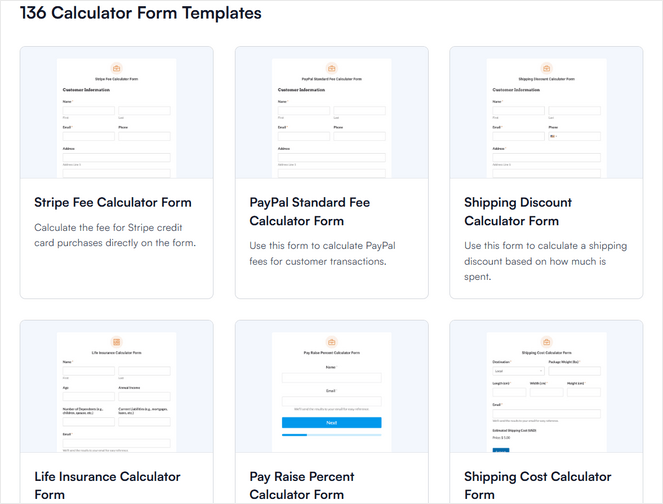
With the easy visual builder, you can also make a custom calculator from scratch using features like dynamic calculation fields, conditional formulas, and built-in mathematical functions for averages, random numbers, rounded numbers, and time range length.
If you know what calculation you need, you can write it manually using the editor, which autocompletes field names and functions as you type.
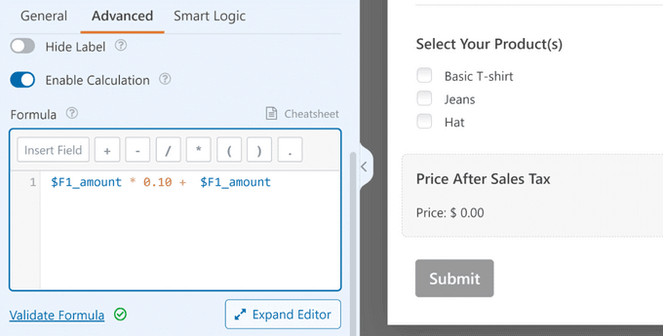
But, if you’re not a math expert, you can click “Generate Formula” and let WPForms AI Assistant do it for you.
I tested this by describing a daily calorie intake calculator in plain language and it generated the correct formula immediately.
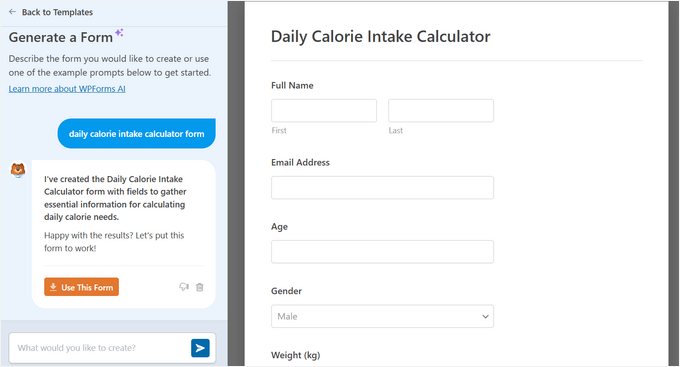
You can easily embed your calculators in any post, page, sidebar, footer, or widget-ready area in WordPress. Your visitors can use your calculator and view their results in real-time, or you can automatically send them their results in an email to grow your subscriber list.
In addition, WPForms plugin offers other powerful features like Stripe and PayPal payments, file uploads, customizable coupons, and user registration, just to name a few. It’s an all-in-one plugin that allows you to easily create custom calculator forms for your exact needs.
| Pros of WPForms: | ✅ Easy drag-and-drop calculator builder ✅ 136+ ready-made calculator templates across a wide range of niches ✅ AI formula builder makes complex calculations accessible to non-technical users ✅ Conditional logic for calculators that adapt based on user selections ✅ Real-time dynamic results as visitors enter their numbers ✅ All-in-one plugin for calculators, contact forms, payments, surveys, and more |
| Cons of WPForms: | ❌ Calculator features require a Pro plan or higher ❌ Overkill if all you need is one simple, standalone calculator |
Pricing: WPForms starts at $49.50 per year. However, to access the Calculations feature, you need at least the Pro plan, which costs $199.50 per year. There’s also a free version of WPForms you can try out.
Why I Recommend WPForms: WPForms is best for bloggers who want one plugin that handles calculators alongside all their other form needs — contact forms, payment forms, lead generation, and more. If you want a calculator that can also collect email addresses, accept payments, or connect to your CRM, this is the one to choose.
2. Formidable Forms: Best for Advanced Calculator Views
- Drag-and-drop calculator builder for complex mathematical operations
- 225+ form templates including mortgage, loan, ROI, and BMI calculator templates
- Automatically calculates fields and supports smart conditional logic
- Support for statistical and scientific calculations beyond basic arithmetic
- Display calculation results as tables, grids, or charts anywhere on your site
- Connects with WooCommece for creating eCommerce price calculators
- Integrates with popular email marketing services
- And more…
Formidable Forms takes calculators further than most plugins by letting you display results dynamically anywhere on your site — not just inside the form itself. It’s well-known as a powerful form builder, and over the years it’s become one of the strongest options specifically for complex calculator needs.
It comes with a drag-and-drop builder and over 225+ ready-made form templates, including dozens of options for online calculator forms like Advanced mortgage calculator, Car payment calculator, Debt to income ratio calculator, Life insurance calculator, and much more.
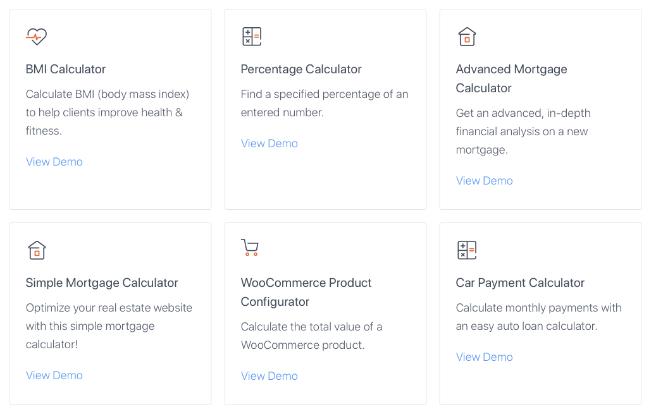
You also have the option of creating your own custom calculator from scratch, no coding required. You can easily add toggles, sliders, radio buttons, and more, to build a calculator that suits your specific needs.
Then, you can add a ‘calculated field’ that will automatically calculate the field entries when a user submits a form. That way, users can see the answer to their calculations in real-time.
I found the formula editor to be more technical than WPForms. It’s great for bloggers who are comfortable working with field names and expressions, but it has a steeper learning curve for beginners.
When I first started testing Formidable Forms, I was particularly impressed by Formidable Views. This feature lets you take the data users submit and display it in tables, grids, calendars, or charts on any page, which opens up possibilities that go well beyond a typical calculator.
Think of a loan comparison tool that shows results side by side, or a fitness tracker that logs and charts a user’s progress over time. Most calculator plugins just show a result below the form. Formidable Views lets you do much more with that result.
In addition, it works with all of the top WordPress themes and it’s mobile responsive, so you can be sure your Formidable Forms calculators will look great on all devices.
| Pros of Formidable Forms: | ✅ Drag-and-drop calculator builder ✅ Extensive template library including niche financial, health, and real estate calculators ✅ Formidable Views lets you display calculation results as tables, charts, or grids ✅ Strong support for complex and statistical calculations ✅ Conversational calculator forms that guide users step by step ✅ WooCommerce integration for dynamic product pricing |
| Cons of Formidable Forms: | ❌ Formula editor has a steeper learning curve than some competitors ❌ Calculator forms require the Business plan |
Pricing: Starts at $39.50 per year. But, you need at least the Business plan to access calculators, which starts at $199.50 per year.
Why I Recommend Formidable Forms: Formidable Forms is best for bloggers who need to display calculator results beyond the form itself — in tables, charts, or dynamic views elsewhere on the page. If you’re building something data-heavy, like a loan comparison tool or a results directory, it handles that in a way most calculator plugins can’t.
3. Calculated Fields Form: Best Budget Calculator Builder

- Calculator builder with drag-and-drop form editor
- Supports health, financial, date/age, and service pricing calculations
- Dozens of pre-made templates
- Includes calculated fields and an advanced formula editor
- AI assistant generates working formulas from plain-language descriptions
- Integrates with popular payment gateways
- And more…
Calculated Fields Form is a free WordPress calculator plugin that’s best for bloggers who want a working calculator on their site without committing to a full form builder. I’ve pointed a lot of bloggers toward it over the years. It’s one of those plugins that consistently does what it promises without much fuss.
It comes with five sample calculator forms you can use on your WordPress site. Choose from templates like simple calculator operations, calculation with dates, ideal weight calculator, pregnancy calculator, and lease calculator.
With this plugin, you can also build your own calculator from scratch. Using the visual editor, you can easily add fields, assign values to those fields, and then add calculated fields, where the values result from mathematical calculations involving other form fields.
Calculated Fields Form works seamlessly with both the classic WordPress editor and the WordPress block editor (Gutenberg), as well as top page builder plugins like Elementor, Beaver Builder, and others.
| Pros of Calculated Fields Form: | ✅ Totally free calculator plugin, no upgrade needed for the basics ✅ Five pre-made calculator templates ✅ Covers health metrics, date calculations, and financial formulas ✅ Conditional logic for calculators that adapt based on user selections ✅ AI assistant generates formulas from a plain-language description |
| Cons of Calculated Fields Form: | ❌ Fewer pre-built calculator templates than the top-ranked options on this list ❌ Limited advanced features |
Pricing: Free. There’s also a premium version available that costs €29.99 (one-time payment).
Why I Recommend Calculated Fields Form: Calculated Fields Form is best for bloggers who want a simple working calculator without paying for a full form builder year after year. The free version covers the basics, and if you need to upgrade, you’re paying once rather than every year.
4. Measurement Price Calculator: Best for Products Sold by Measurement

- Easy measurement price calculator for WooCommerce
- Two calculator modes: quantity-based and user-defined
- Pricing calculator table feature
- Pricing calculator inventory support
- Option to set minimum and maximum values
- Special 'Room Walls' calculator for selling wallpaper
- And more…
Measurement Price Calculator is a WooCommerce plugin built for a very specific problem: selling products that are priced by measurement rather than by simple unit count.
If you run an online store selling fabric by the yard, tile by the square foot, wallpaper by the roll, or foam by volume, standard WooCommerce quantity pricing doesn’t work — and this plugin fills that gap.
During my testing, I discovered there are two calculator modes. First, the quantity-based mode is for products with a fixed unit size, like a box of tile that covers 10 square feet. The customer enters their room dimensions, and the calculator figures out how many boxes they need.
The user-defined mode is for products made to order, such as fabric cut to the length the customer specifies, or mulch sold in whatever volume they need. The customer enters their own measurements, and the price updates automatically.
I found the setup process pretty straightforward, though it requires more product-level configuration than a standalone calculator plugin. For each product, you define the measurement type, set your pricing rules, and configure whether you want tiered pricing based on quantity.
The tiered pricing feature is particularly useful. For example, you can offer lower per-unit rates for larger orders, which is a common need for materials retailers.
Plus, the dynamic shipping weight calculation is a helpful feature I don’t see often. If a customer orders more fabric, the shipping weight increases automatically. That way, your shipping rates stay accurate without any manual adjustment.
| Pros of Measurement Price Calculator: | ✅ Built specifically for measurement-based pricing in WooCommerce ✅ Two calculator modes for fixed-unit and made-to-order products ✅ Tiered calculator pricing tables for volume discounts ✅ Dynamic shipping weight calculation based on order measurements ✅ Specialised Room Walls calculator for wallpaper retailers |
| Cons of Measurement Price Calculator: | ❌ Requires WooCommerce — not useful for bloggers without a store ❌ Expensive for a single-use calculator |
Pricing: Starts at $12.42 per month, or $149 billed annually.
Why I Recommend Measurement Price Calculator: Measurement Price Calculator is best for WooCommerce store owners who sell products by dimension, area, or volume. If your products are priced by measurement and standard quantity fields don’t work for your store, this is exactly what calculator plugin you need.
5. Responsive Mortgage Calculator: Best Free Mortgage Calculator Plugin

- Simple responsive mortgage calculator via shortcode or widget
- Input fields for home price, down payment, payment period, etc.
- Set the interest rate compounding period for your region
- Popup summary with amortization chart
- Multiple styling options to choose from
- And more…
Responsive Mortgage Calculator is a free calculator plugin that adds a clean, mobile-friendly mortgage estimator to any page, post, or sidebar on your blog. For a finance or real estate blogger who wants to give readers a quick mortgage calculation tool, it’s the most straightforward option available.
I found that the setup is super simple. Just install the plugin, activate it, drop the shortcode or widget onto the page you want, and the calculator appears. There are no complex configuration steps before it works.
Visitors enter a home price, down payment, interest rate, and loan term, choose their payment frequency, and get an instant result. Clicking the chart icon opens an amortization schedule popup that breaks down how payments change over the life of the loan.
The customisation options are decent for a free plugin. You can switch between light and dark themes, adjust how currency is displayed, rename the field labels, and set default values via shortcode attributes, which is useful if you want to pre-fill an average home price for your market.
For bloggers who want more control over the visual styling, removing the built-in CSS and letting your theme take over is also an option.
There is one thing worth knowing before you install it: The amortization chart popup links to the developer’s own mortgage site. Some users have flagged this as a conflict of interest, particularly for mortgage professionals who don’t want to advertise a competitor’s service to their clients.
| Pros of Responsive Mortgage Calculator: | ✅ Completely free with no required upgrades for basic functionality ✅ Fast to set up — there’s no configuration required before it works ✅ Amortization popup with chart for detailed mortgage breakdowns ✅ Responsive and mobile-friendly out of the box ✅ Customisable labels and currency format |
| Cons of Responsive Mortgage Calculator: | ❌ Amortization popup links to the developer’s own mortgage site ❌ Only one calculator per page is supported ❌ Limited features compared to other calculator plugins |
Pricing: Free.
Why I Recommend Responsive Mortgage Calculator: Responsive Mortgage Calculator is best for finance or real estate bloggers who want a free, no-fuss mortgage estimator for their readers. If you’re a mortgage professional using it on a client-facing site, check the amortization popup behaviour first — it may not be right for that use case.
6. Price Based on Country for WooCommerce: Best Calculator for International WooCommerce Stores

- Automatically calculates price by applying the exchange rate
- Sell and receive payments in multiple currencies
- Front-end country switcher
- Shipping currency conversion
- Compatible with WPML for multilingual blogs
- And more…
Price Based on Country for WooCommerce is a calculator plugin that automatically shows each visitor the price for their country, in their currency. So, a buyer in Germany sees euros, and one in Australia sees Australian dollars, without you maintaining separate product listings for each region.
The setup is straightforward. You install the plugin, define your geographic zones, and set a price or exchange rate for each zone. From that point on, the plugin handles detection automatically using WooCommerce’s built-in geolocation.
When a visitor lands on your store, their location is identified and the correct price appears immediately — they never see a currency that doesn’t apply to them.
It also comes with a country switcher feature that allows your visitors to change their country from the front-end of your WordPress site.
What I find most useful about this plugin is that the checkout is completed in the customer’s actual currency. With some international pricing setups, the customer sees local prices but gets charged in USD at checkout, with the conversion happening through the payment gateway.
Price Based on Country avoids that friction entirely. The price the customer sees is the price they pay, which reduces confusion and cart abandonment.
| Pros of Price Based on Country for WooCommerce: | ✅ Currency conversion calculator for WooCommerce store owners ✅ Automatic geolocation — no action required from the visitor ✅ Checkout completes in the customer’s local currency, no gateway conversion ✅ Free core version covers the essential functionality ✅ WPML certified for multi-language WooCommerce stores |
| Cons of Price Based on Country for WooCommerce: | ❌ Requires WooCommerce ❌ Automatic exchange rate updates require the Pro version |
Pricing: Free. If you want more features, there’s also a premium version that starts at $59 per year.
Why I Recommend Price Based on Country for WooCommerce: Price Based on Country is best for WooCommerce store owners who sell internationally and want customers to see and pay in their own currency. The free version is enough for most stores, but you can upgrade to Pro if you need exchange rates to update automatically.
7. Uni CPO: Best Calculator Plugin for Customizable WooCommerce Product Pricing
- Custom price calculator for WooCommerce
- User-friendly visual form builder
- 10+ custom product option types
- Supports any mathematical formula
- Includes formula and fields conditional logic
- Apply different shipping classes based on the chosen product options
- And more…
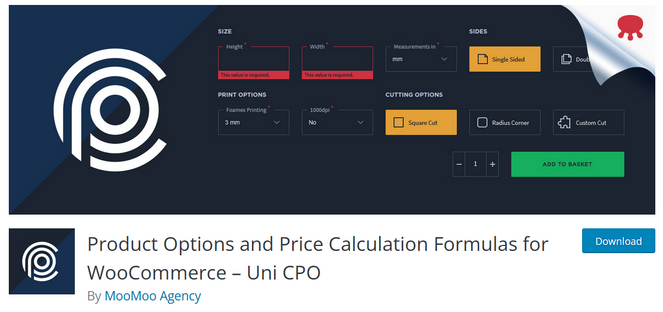
Product Options and Price Calculation Formulas for WooCommerce – Uni CPO is another calculator plugin for online store owners. It allows you to add additional WooCommerce product options and custom price calculations based on any math formula.
I think it’s the perfect plugin for anyone creating custom products, like a custom-size rug, a banner in customer-entered dimensions, or a personalized gift where the number of characters affects the cost.
Instead of fixed sizes and colours, Uni CPO lets customers configure their own product — specifying dimensions, choosing materials, adding custom text, uploading a file — and calculates the final price dynamically based on a formula you define.
The plugin comes with a visual form builder that lets you display more product options by dragging and dropping them into place. It also includes conditional logic and formulas to calculate pricing based on the users’ selection.
| Pros of Uni CPO: | ✅ Price calculator for custom configurable WooCommerce products ✅ Dynamic price calculation based on any combination of customer inputs ✅ Formula and fields conditional logic for complex pricing structures ✅ Dynamic shipping weight calculation based on product options ✅ Free plugin includes the core formula and customization features |
| Cons of Uni CPO: | ❌ Formula setup requires more learning than a drag-and-drop interface ❌ Only works with WooCommerce |
Pricing: Free.
Why I Recommend Uni CPO: Uni CPO is best for WooCommerce store owners selling products where customers configure their own specs and the price depends on what they choose. If your products are made-to-order or fully customizable, and standard variations can’t capture that, this plugin handles it in a way most WooCommerce tools can’t.
8. WP Calorie Calculator: Best Free Calorie and Macro Calculator Plugin
- Easy calorie calculator for your website
- Calculates daily calorie intake, Basal Metabolic Rate (BMR), macronutrients, and BMI
- Display results in the form or email results to users
- Two color palette options
- Use shortcode to display the calculator anywhere on your site
- Works with metric and imperial units, with automatic conversion between the two
- And more…
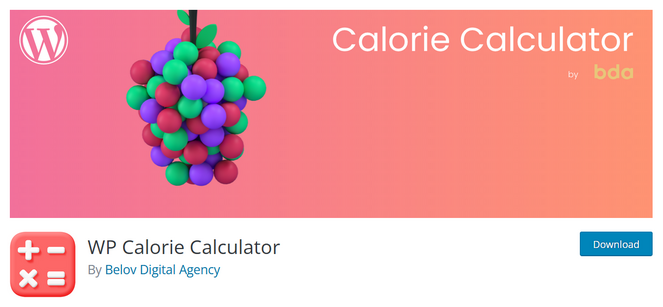
WP Calorie Calculator is a great option if you have a food website or health and fitness blog. It makes it easy to add personalized calorie and macro calculators to your site without having to build the formulas yourself.
This calculator plugin uses the Mifflin–St. Jeor formula, which identifies basal metabolic rate (BMR) based on details like age, height, body mass, and biological sex. Users can also add information about their goals, conditions, and activity levels. After entering those details, the plugin calculates the user’s daily calorie consumption.
The setup is beginner-friendly since the calculations are already built in. You can customize the fields from the plugin settings page and embed the calculator anywhere on your site using a shortcode.
You can choose how you want to deliver the results to users, either directly in the form or by email, which is a great option if you’re trying to create an email newsletter.
| Pros of WP Calorie Calculator: | ✅ Email-gated results turn calculator usage into lead capture ✅ Accurate Mifflin-St. Jeor formula with metric and imperial support ✅ Users can download their results as a PDF ✅ Results emailed to users automatically ✅ Integrates with Mailchimp, HubSpot, ConvertKit, Zapier, and more |
| Cons of WP Calorie Calculator: | ❌ Focused exclusively on calorie/nutrition calculation, not a general-purpose calculator ❌ Macro calculations require the Pro version |
Pricing: Free. There’s also a premium version with advanced features starting at $39 per year.
Why I Recommend WP Calorie Calculator: WP Calorie Calculator is best for health and fitness bloggers who want a practical tool their readers will actually use — and who want to grow their email list in the process. The email-gated results approach works particularly well in this niche because the personalized output is worth sharing an email address for.
9. Cost Calculator Builder: Best for Simple Service Quotes and Pricing Estimates
- Drag-and-drop builder for creating pricing estimate forms
- 10 core WordPress calculator elements
- Responsive calculator layouts that work on mobile devices
- Embed calculators anywhere on your site using shortcodes
- Allows you to create unlimited calculation forms
- And more…
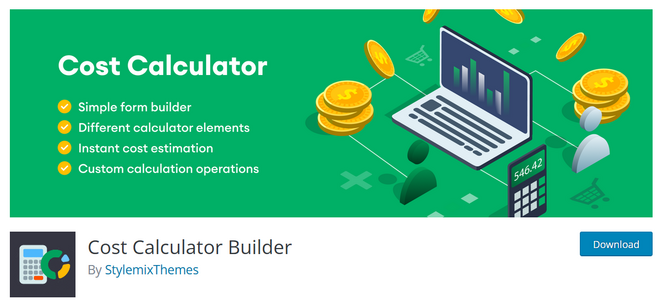
Cost Calculator Builder is a good option for bloggers or small business owners who want to offer instant pricing estimates on their website. Instead of asking visitors to submit a contact form and wait for a reply, you can let them calculate their quote directly on the page.
I found the setup process beginner-friendly compared to some other calculator plugins I tested. You can build calculators using the drag-and-drop editor, adjust the pricing values, and customize the fields without touching code.
The free version includes enough features for simple quote calculators, especially for service businesses like cleaning, photography, fitness, or web design.
The formula builder is one of the standout features because it makes it easy to create dynamic pricing calculations based on user selections. You can combine fields, set pricing rules, and build custom quote forms without needing technical knowledge.
In addition, you can create an unlimited number of calculation forms and insert them on any post or page in WordPress.
| Pros of Cost Calculator Builder: | ✅ Beginner-friendly drag-and-drop builder ✅ Easy to create custom pricing formulas ✅ Good selection of calculator fields and input options ✅ Free version is enough for simple quote calculators ✅ Works with Elementor, Gutenberg, and WPBakery |
| Cons of Cost Calculator Builder: | ❌ No template access in the free plugin ❌ Analytics and WooCommerce integration are Pro-only |
Pricing: Free. There’s also a premium version available starting at $59 per year that includes 100+ templates, conditional logic, analytics, and more.
Why I Recommend Cost Calculator Builder: Cost Calculator Builder is best for bloggers who also run a service business and want to give visitors instant pricing estimates on their website. The free version is beginner-friendly and flexible enough for simple quote calculators, while the Pro version adds templates and business tools for managing enquiries and payments.
10. Stylish Cost Calculator: Best for Lead Capture with Price Reveals
- Drag-and-drop calculator builder for instant price estimates
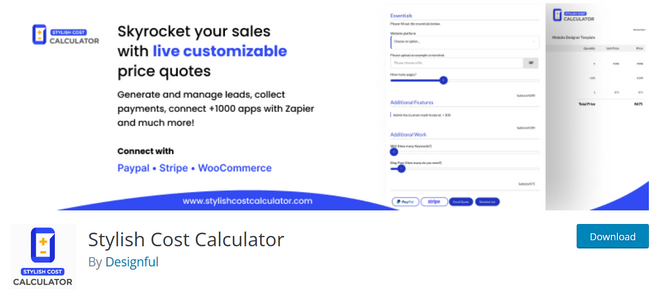
- Blurred price reveal — hides the total until the visitor provides their contact details
- AI-guided calculator setup and calculator templates
- Variable calculations (e.g. length x width x height, package pricing)
- Email and PDF quote generation
- Works with Elementor, Divi, and other major page builders
- And more…
Stylish Cost Calculator stands out because it treats the calculator as a sales tool, not just a form. It gives you the option to blur the total until the visitor enters their contact details, which turns every calculator interaction into a potential lead.
The blurred price reveal isn’t the only approach available. You can also show prices openly and use the calculator purely for engagement. But for service businesses where the goal is to capture leads, the blurred reveal is a conversion tactic I haven’t seen in many other plugins.
The AI setup wizard walks you through building your first calculator by asking what your business does and what you want to charge for — it generates a working calculator structure based on your answers. I tested this for a photography business and had a functional draft in a couple of minutes.
The SMS feature is unusual for a calculator plugin and worth mentioning. You can send quotes via SMS and manage two-way conversations from a dashboard inside WordPress. This is useful for service businesses where a quick back-and-forth after a quote request is part of the sales process.
| Pros of Stylish Cost Calculator: | ✅ Blurred price reveal turns calculator completions into lead capture opportunities ✅ AI setup wizard builds your first calculator from a plain-language description ✅ SMS quote delivery and two-way messaging dashboard ✅ Lead source analytics to track enquiry origins ✅ Email and PDF quotes generated automatically on submission |
| Cons of Stylish Cost Calculator: | ❌ The free version is very limited ❌ Steeper learning curve than simpler calculator plugins |
Pricing: There is a free version available to download. For more features, you need to upgrade to the Pro version, starting at $109.99 per year.
Why I Recommend Stylish Cost Calculator: Stylish Cost Calculator is best for service-based bloggers who want their pricing tool to capture leads, not just display results. If you want visitors to see that a price has been calculated — and then give you their contact details to unlock it — this is the plugin built specifically for that approach.
What is the Best Calculator Plugin for WordPress?
For most bloggers, WPForms is my top pick for the best calculator plugin. The Calculations addon gives you 136+ ready-made calculator templates, an AI formula builder, and real-time dynamic results — all inside the same plugin you’d use for contact forms, payment forms, and email signups.
The fact that everything stays within WordPress, requires no code, and works with your existing form setup is a big advantage. If you’re going to add one tool that covers calculators and all your other form needs, WPForms is the one I’d choose.
That said, a few alternatives are worth pointing out based on your specific situation. If you need to display calculation results in tables or charts elsewhere on your page, Formidable Forms handles that in a way WPForms doesn’t.
And if you’re on a budget, Calculated Fields Form is the strongest option with a free plugin and a one-time purchase model for the premium version.
FAQs About WordPress Calculator Plugins
Still have questions? Here are my answers to the most common questions our readers ask about calculator plugins:
Do I need coding skills to add a calculator to my WordPress blog?
No. Every plugin on this list includes a drag-and-drop builder or pre-built templates that work without writing any code. Plugins like WPForms are specifically designed so you can have a working calculator live in under ten minutes, with no technical background required.
Which free WordPress calculator plugin is best?
For a general-purpose free calculator builder, Calculated Fields Form has a capable free version that handles a wide range of formula types. Cost Calculator Builder and Stylish Cost Calculator also have free tiers, though more advanced features like conditional logic and payment collection require a paid plan.
Will a calculator plugin slow down my WordPress site?
In most cases, the performance impact is minimal. Calculator plugins typically load a small amount of JavaScript to handle the calculations on the visitor’s side. That said, it’s worth testing your page speed after installation, particularly if you’re using a plugin with a lot of additional features loaded on every page. Plugins like WPForms are built with performance in mind and load scripts only where the form is placed.
What types of calculators can I add to my blog?
The range is wider than most bloggers expect. Mortgage and loan calculators, BMI and calorie counters, pricing estimators, ROI calculators, measurement-based product pricing, insurance quotes, fitness trackers, travel cost calculators, and budget planners are all common use cases. Plugins like WPForms include 136+ pre-built calculator templates covering most niches, so there’s a good chance a template already exists for what you have in mind.
With that, we’ve come to the end of this list of the best calculator plugins for WordPress that are both free and paid! I hope you found the right calculator tool for your blogging needs.
If you enjoyed this post, you might want to see our expert picks of the best WordPress survey plugins, or check out our guide on how to create an online course with WordPress.
And don’t forget to sign up for our email newsletter for more helpful blogging tips!

Great post! I’ve been considering On Cloud Shoes for a while, and this review was really helpful.
They seem like an excellent choice for everyday comfort and performance.
Thanks for sharing these valuable insights!
This is a simple comment and this is a below link: https://oncloudstore.com.mx/
What a game-changer in the astrology world! The AI technology behind these readings analyzes patterns and transits with incredible precision. I love how the artificial intelligence learns and improves over time. This is the modern way to explore astrology – efficient, accurate, and always available!
I really like how Dandy Hats can add personality to a simple jeans and T-shirt look. dandy hats